Friday, February 25, 2011

Using Students Experts

"An expert knows all the answers - if you ask the right questions." - Levi Strauss. "Have you heard of this new thing called the internet? It's giving people new expectations. It's allowing them to become their own expert. Knowledge lies anxious at their fingertips." - Roy H. Williams


Angie Thompson's "daily experts" technique is a simple way to encourage student participation - both in traditional and online classes. "I list five or six students’ names on a PowerPoint slide at the beginning of my classes.... These individuals, assuming they are in class, then become my daily experts—the first ones I ask questions to or opinions of before opening discussion to the whole class. " Thompson says this technique breaks the ice and helps students realize that she is approachable. Other benefits she cites are providing for one-on-one interaction in large classes, encouraging class preparation, allowing all students at least one chance to speak in class, helping the instructor to learn names, and offering engagement to the entire class. I suspect that the accountability for class attendance - knowing that your name may be on the board today - may be positively affected as well. 


Anonymity in the Confer classroom is both a good and bad thing. It's good when students don't feel embarrassed about their opinions or lack of skill. It's bad when students become disengaged, alienated, and feel that their performance and/or participation are unimportant or ignored. Having a technique like "daily experts" - which reinforces accountability - allows you as an instructor to make sure that your students feel individually responsible for paying attention, coming to class prepared, and participating in their own learning experience. 


Since you have a class roster with the names of students always available, you don't have to prepare a PowerPoint slide before class with the names of the day's experts. Instead, you can select from the list of those present. Using the whiteboard tools, you can have the experts posted (see the image above) as an initial class activity, which will add to the intrigue and anticipation of the session. Doing this acknowledges students' presence and helps you (and the other students) get to know them as individuals. Students will begin to appreciate that there is no "hiding" in your classroom. And you'll benefit from the insights they give you into how well the material is being absorbed and understanding is growing.


Saturday, February 19, 2011

On the Horizon


The New Media Consortium's 2011 Horizon Report, produced jointly with EDUCAUSE, predicts technologies which will have a large impact on teaching, learning, and creative expression in higher education. Now in its eighth year of publication, the report is distinguished by predictions of adoption cycles in education; i.e., how long it will take teachers and schools to actually use these emerging tools. Let's look at what's on the near-term (one year or less) horizon.
 
Mobile computing is on the short adoption cycle (as with last year's report). Last year, Horizon cited the wide range of activities mobile devices make possible; this year, the report says, "mobiles are here because so many people use them as their first choice for accessing networked resources." For online instructors, the impact of mobile devices is that they can literally teach from and to anywhere there is a cell signal. I'm looking forward to the Java-enabled mobile device that supports Confer sessions, and at the same time I'm pushing for a mobile-ready version of the Confer classroom.


Also singled out for near term adoption are electronic books. Yes, we all know that texts can be downloaded and read on mobile devices, and that both devices and content are now readily available. But that's not the real point: "What makes electronic books a potentially transformative technology is the new kinds of reading experiences that they make possible." What's happening with this new technology is that our definition of "reading" is changing, with audiovisual, interactive, and social components mixing into the act and extending the process.


These predictions will be welcomed by iPhone, Android, Kindle, iPad, and shiny new app owners. It's important to remember, though, that we serve a student population that includes a large number for whom constant Internet access is not a given, and some for whom "reading" on a small screen is more of an obstacle than an advantage. We have to be careful not to create a new digital divide: between the mobile "haves" and the desktop- or "dumb-phone"- bound "have-nots": new technology adoption has to occur in a relevant and practical context.

Meanwhile, I'm excited by what's on the horizon. How about you?

Friday, January 28, 2011

Brevity is the Soul of Confer

"Be sincere, be brief, be seated." - Franklin D. Roosevelt's advice on public speaking.

We've said it here before: it's different online. Students don't come to the online classroom with the same expectations, instructors don't behave the same way online as in the traditional classroom, and the online classroom itself presents an environment that encourages some types of behavior while discouraging others. One thing the online classroom does not encourage is long, inactive lecturing. In fact, the best Confer sessions tend to be the ones that end quickly.

I was reminded of that when I read a Tim Sanders' piece about the power of a short talk. He used the example of TED Talks, which were designed with an 18-minute keynote time limit that is enforced with an active moderator and a public countdown timer. Richard Saul Wurman, who co-founded TED, was asked in an interview why he decided on 18 minutes. His answer: that's the time it usually takes for him to get bored when he's listening to someone.

There are several reasons why we should try to keep our Confer lectures short, even if this means that we have to provide more of them than we would face-to-face sessions. For one thing, it takes students longer to read and understand online content, so we can't flood the screen with print the same way we can deliver handouts to students in a classroom. (We can still deliver these handouts online, of course, but we should allow students to process them offline.) In the age - and medium - of YouTube, three minutes is ideal and five minutes is eternal. So an archived lecture that lasts for 20 minutes and requires students to watch it in its entirety is ... optimistic. Bandwidth is one concern, since nobody likes to wait for content to download, but the real issue is user expectations and behavior in this medium. Since YouTube and other online media have created the expectation that information can be packaged in condensed "chunks" for short viewing, online instructors may find it helpful to condense their own deliveries into shorter, more dynamic "clip-link" packages that allow students to access the information in parses and from multiple paths.

Friday, January 21, 2011

Quick: What Did I Just Say? Tests as Learning Tools

“I think that learning is all about retrieving, all about reconstructing our knowledge. I think that we’re tapping into something fundamental about how the mind works when we talk about retrieval.” - Jeffrey Karpicke, Purdue University.

A new study published this week by Jeffrey Karpicke and Janell Blunt suggests that when students are asked to recall what they just finished reading, they will retain (remember) 50 percent more of the information a week later than they will by using classic studying techniques (i.e., cramming) or by using concept maps. Although studying and using concept maps are effective, what the researchers call "retrieval practice" - the active process of reconstructing knowledge by recalling information in order to answer questions - appears to be superior as a form of active learning. The authors write, "retrieval is not merely a read out of the knowledge stored in one's mind - the act of reconstructing knowledge itself enhances learning."

This supports something I've learned from Confer instructors: the virtual classroom, because it is synchronous and interactive, is a great place to do quick assessments that have an impact on learning. Instructors want to make the most of every online minute with their students, but those minutes may be wasted unless students are asked to reflect upon, respond to, and remember what you've taught them.

Larry Green, for example, has found that the "1-2-3: Put it in the Chat Box" method works well as a way to spot-check students' learning and understanding.
By using this simple and spontaneous assessment method, Larry reinforces retrieval practice and thus (if the researchers are correct) enhances the learning process.

Another quick and effective tool in the Confer classroom is the Polling tool. This works well because it engages students' attention, can be used to enforce retrieval practice, provides immediate feedback, and protects (at your discretion) student anonymity. All that, and it's incredibly easy to do. This video demonstrates the process, and you can print out this PDF to use as a "cheat sheet" if you like.

While retrieval practice is important, you may find that the quick assessment is useful even before students have started to learn new materials. By forcing students to answer a question (take a stand), you're increasing their commitment to discovering the answer. Now it seems that we're also increasing the chances that they will retain that answer in long-term memory. So, as every good host reminds every guest, "don't hesitate to ask."

Monday, January 17, 2011

We Are the Message; The Message Is Us

“The medium isn’t the message. The message is the message.”- Andrew Bosworth, Director of Engineering at Facebook. "We think that we should take features away from messaging. It should be minimal.”- Mark Zuckerberg, founder of Facebook.


The Pew Research Center recently studied how young people communicate with their friends. Although e-mail is not used as a daily tool, it hasn't been completely abandoned by today's students. In fact, it's used primarily to talk (communicate) with institutions (like colleges) and adults (like professors). Text messaging has grown astronomically in the last three years by this age group, while other forms of communication seem to have stabilized or dropped off slightly.


The low-cost, mobile nature of text messaging is probably a major factor in its quick adoption and growing popularity among today's students. Texting also allows for rapid, asynchronous communication with a wide network of friends, which ordinary phone calls do not provide. There is some research to indicate that texting is used primarily to maintain relationships, and that girls use it more often than do boys as a means of socializing.

In the Confer classroom, the closest equivalent to texting is the chat area. There are ample opportunities to "talk" to other classmates and/or the instructor, but these may not have the same impact or serve the same purpose as does the chat message, generally directed "to the room" and instantly shared with anyone who's looking at the screen.

Chat, in other words, may be the tool best fitted to creating and reinforcing social ties and friendships between and among your students. Because it is not anonymous, but is devoid of "face" and "voice" identifiers, it has a kind of power in the online environment that is reassuring and self-reinforcing. It may also provide valuable social support and comaraderie to otherwise isolated students in your classroom.

It's not easy to monitor chat when you're busy providing other content to your students. That may incline you to take it away from your students, and there is certainly justification in trying to eliminate unnecessary distractions. But it may also be necessary, given the nature of modern communications and growing social networking trends, to include chat in at least part of your online classroom in order to promote interaction and the co-evolution of learning and insights. 

Friday, December 17, 2010

Being Ready (and Willing) to Teach (and Learn) Online

"Every act of conscious learning requires the willingness to suffer an injury to one's self-esteem. That is why young children, before they are aware of their own self-importance, learn so easily." - Thomas Szasz
Everett Rogers, in The Diffusion of Innovations, identified five stages to the diffusion of innovations: (1) knowledge; (2) persuasion; (3) decision; (4) implementation; and (5) confirmation. A scholar with the same last name, Patricia Rogers, found that innovation in higher education often stalled at the implementation stage because of several interrelated barriers: funding, release time, training, and technical support among them. Other researchers have cited faculty compensation, issues related to organizational change, political factors, and pressure to increase enrollments as barriers to technology adoption in higher education. A recent study by Surry, Grubb, Ensminger, and Ouimette surveyed faculty from 660 colleges of education accredited by the National Council for Accreditation of Teacher Education to determine what barriers and enablers to implementation of Web-based learning were perceived in their institutions.
Importantly, faculty who had never taught a Web-based course saw time as a key barrier to implementation, while faculty who had taught such courses did not list time as problematic. These same non-users - faculty who had never taught Web-based courses - thought flexibility might be an advantage to teaching such a course, while their experienced colleagues who had taught them did not recognize greater flexibility as an advantage. The most commonly listed suggestion from non-users and experienced Web instructors alike was that training was essential to implementation at their institutions. There were statistically significant gender differences in the responses, with females perceiving their institutions' preparedness more favorably than males and males self-reporting their own technological readiness higher than did females.
There have been numerous efforts to assess students' perceptions of barriers and enablers to online instruction. The 2010 Student Readiness Report found that females who preferred online courses had higher means on individual attributes and typing accuracy while males who favored online instruction had higher means on reading rates and technical knowledge. The Louisiana Board of Regents uses SORT (Student Online Readiness Tool) to measure students' readiness for online courses. SORT includes measures of technology experience, access to tools, study habits, lifestyle factors, student goals, and learning preferences in its assessment. Portland State University provides a self-assessment tool for students designed to help students realize that online classes require self-motivation and self-discipline (log in regularly, interact with online discussions, complete assignments, etc.), time management, technical and computer skills, and communication skills (including "netiquette").
San Diego City College has an Online Learning Readiness Assessment designed to determine whether students have the "technical and student skills" necessary to succeed in an online course. There are 20 questions in this tool (modified below):
1. My reason for taking an online course
2. How often can you log into your online course?
3. How much time will you spend studying and interacting with your online course?
4. How do you rate traditional classroom discussion with an instructor and other students?
5. How much help do you need when an instructor hands out directions for an assignment?
6. How do you prefer information to be presented?
7. Are you motivated to meet deadlines?
8. If you have a disability, do you know who to contact for assistance?
9. If you don't understand an assignment, do you know who to contact?
10. Are you comfortable working with computers?
11. Are you comfortable with file management?
12. Do you know how to use a word processor?
13. Are you comfortable using an Web browser?
14. Are you comfortable using e-mail?
15. Are you comfortable using a mouse?
16. How are your keyboarding skills?
17. What will you do if your computer breaks down or you lose your Internet connection?
18. What speed is your Internet connection?
19. Are you comfortable downloading and installing programs?
20. Where would you go for technical support?
Similar questions might be useful for a faculty member considering teaching an online course. We need to know more about what helps online instructors master their courses and virtual classrooms so that we can help others make the transition more smoothly. But we're definitely in Stage 4 (Implementation) of online innovation, with many signs that confirmation (the final stage) has become widespread. Thousands of faculty members have decided to continue teaching online and to use tools like Confer to maximize the potential of this innovation. 
Are you ready?

Friday, December 10, 2010

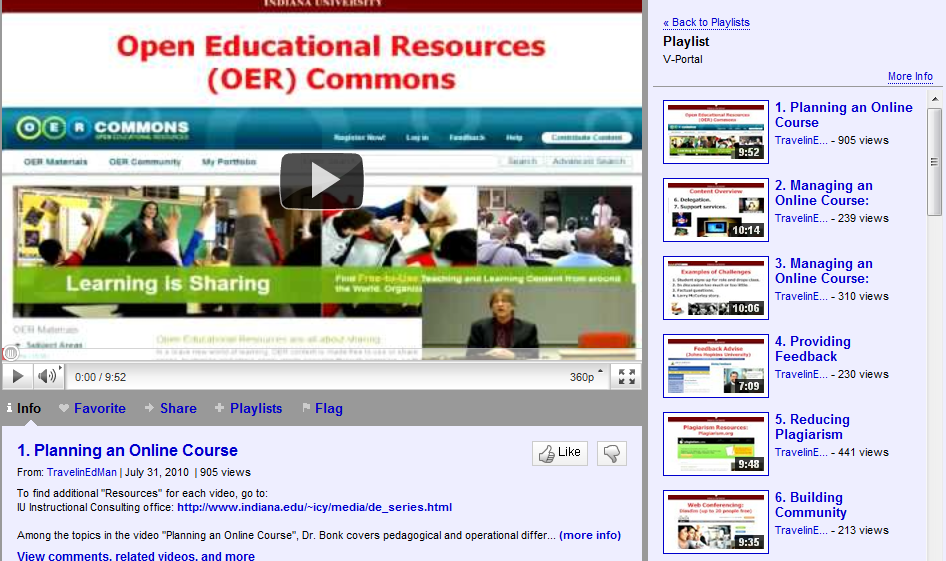
V-Portals from the Open World

Curt Bonk, author of The World is Open, announced in his blog last week that he has designed and produced a series of 27 brief (7 to 10 minutes each) videos about teaching online. He's calling it the "V-Portal" for "Video Primers in an Online Repository for e-Teaching And Learning" and you can access the series at the V-Portal here. They're also conveniently available on YouTube here as a playlist. I recommend them for anyone interested in professional development, individual discovery, or introducing a topic related to online instruction to an audience or planning group.

Here's the topic list:
1. Planning an Online Course
2. Managing an Online Course: General
3. Managing an Online Course: Discussion Forums
4. Providing Feedback
5. Reducing Plagiarism
6. Building Community
7. Building Instructor and Social Presence
8. Online Relationships: Student-Student, Student-Instructor, Student-Practitioner, Student-Self
9. Fostering Online Collaboration/Teaming
10. Finding Quality Supplemental Materials
11. Blended Learning: General
12. Blended Learning: Implementation
13. Blended Learning: The Future
14. Online Writing and Reflection Activities
15. Online Visual Learning
16. Using Existing Online Video Resources
17. Webinars and Webcasts
18. Podcasting Uses and Applications
19. Wiki Uses and Applications
20. Blog Uses and Applications
21. Collaborative Tool Uses and Applications
22. Hands-On/Experiential Learning
23. Coordinating Online Project, Problem, and Product-Based Learning
24. Global Connections and Collaborations
25. Assessing Student Online Learning
26. Ending, Archiving, Updating, and Reusing an Online Course
27. Trends on the Horizon

Each video provides a good overview of its topic and suggestions for instructors considering using the relevant technology. For example, Topic 17 (Webinars and Webcasts) mentions most of the major players in the Web conferencing and lecture capture arena, with examples, and includes these suggestions for instructors:
  • Have an orientation/practice session before your first "live" Web conference with students
  • Check (at least 15-20 minutes early) to make your equipment works
  • Explain the purpose of the session/task
  • Schedule breaks for your students
  • Avoid talking for more than 15 or 20 minutes without pausing
  • Use polls or surveys to engage students
  • Archive the event for students who miss it
  • Review what you've covered at the end of the session
  • Follow up a synchronous experience with an asynchronous one (or vice versa)
  • Hang a "Do Not Disturb" sign outside your office door (and keep water handy)
  • Select a time that takes all students into account
  • Embed synchronous sessions where and when they best fit
  • Create an agenda for each session
  • Give students tips and guidelines for the Web conferencing technology
  • Be highly organized but flexible
  • Attend faculty development sessions on Web conferencing if possible
Good advice, and well presented! Thank you, Dr. Bonk.


Get Twitter Fan Box Widget