Showing posts with label online learning. Show all posts

Friday, May 2, 2014

Marshall McLuhan and Web Conferencing: What Message Is Our Medium?

I've just read a fascinating chapter by Mark A. McCutcheon which reflects on Web conferencing, Marshall McLuhan's thinking, and intellectual property issues. The print version appears in McLuhan's Global Village Today: Transatlantic Perspectives (Pickering and Chatto, 2014, ISBN-13:9781848934610) and a "pre-copyedited, pre-print version" is available here. The author covers more than I can describe here (and does a better job than I can), but I'd like to explore a few points specifically related to the Web conferencing medium.

McCutcheon was asked to present a paper at a conference which, as it turned out, he could not physically attend. Instead, he used Web conferencing to present his paper. But what does that mean, he asks? "I was neither present at the event, nor presenting a paper, as denoted by academic tradition, so much as orchestrating an audio-visual 'presentation,' at once a performance and a recording" (emphasis added). He presented "a digital slideshow, video images of my talking head and of the room of delegates..., and my microphoned voice, as I spoke the text of my paper." The session was recorded and can be "called up, replayed and paused, and distributed as a link with a password."

Web conferencing, says McCutcheon, "blurs the lines between performance and recording, between presence and representation." He goes on to describe a "dubject" created by this kind of technology, "assembled through technologies of mechanical reproduction, and distributed through networks of electronic distribution that blur the boundaries between ... consumer and commodity, the organic self and technological others...." We who use Web conferencing and similar technologies to reach distant audiences and/or future audiences are using "dubjection": "a technological doubling and spacing of the self."

He describes the spacing vividly:

On the day of the proceedings, I wasn't at Marburg, or at AU... If the conjunction at connotes a sense of place, of position - a humanistic, common-sense expression of live, embodied presence - then in that sense, I was somewhere, of course: I was at a neighbour's house. But that place became neither here nor there, so to speak, for the duration of my attendance at the conference. Would it be more precise to say that, at that time, I was "@" a number of spaces at the same time?... My image and voice projected into the Marburg town hall, racing unplumbed lengths of cable and unknown airborne frequencies, translated into strings of ones and zeroes as dense and complex as protein chains. Routed and rerouted through data centres and ISP addresses across the Atlantic (and quite possibly elsewhere), my dubjected presence traversed any number of relays and channels in the global IT network, less a village, certainly, than a vast electric ocean.
 All of us who have practiced Web conferencing are familiar with this disconnect. We're "here" and "there" at the same time, and our audience is "there" but we want them to be "here" while we're communicating with them. We want to see them and gauge their reactions, inspire them, motivate them, connect with them. The technology allows us to do some of that - more than we expected, in many cases - but it can't (yet) hide the "dubjection" effect. McLuhan said once that "media are a means of extending and enlarging our organic sense lives into the environment." That's why we confer (Confer) through Web conferencing.

The medium (Web conferencing) may well be the message. McLuhan proclaimed famously that "it is the medium that shapes and controls the scale and form of human association and action" (p. 9) and that "the 'message' of any medium or technology is the change of scale or pace or pattern that it introduces into human affairs" (p. 8). To ignore the change of scale, pace, and pattern that the virtual classroom engenders is to disconnect with the experience and the audience(s) we're trying to address. This evolving medium has the capacity to enrich our perceptions, insights, connections, and understanding of one another, provided we exploit its potential and help students and audiences to adapt to it.

Friday, March 7, 2014

Sail Into Online Student Success: Come to San Diego This June!

We've finalized the program for the 2014 Online Teaching Conference and looks like a terrific lineup! If you're an online educator, you spend a lot of time alone with your computer and your problems. At OTC, you're not alone! You can get critical insights directly from your colleagues, share your experiences, learn the latest strategies, and become a part of our wonderful community of online professionals. Join us June 20 and 21 for a comprehensive exploration of online teaching and learning. Get ready for two interactive days of learning that will prepare you to lead your institution with new ideas to power up online student success.

The OTC team has put together a top-notch program of sessions - presented by real online education professionals. Join us in San Diego for a unique professional development and networking event with opportunities to learn from distance education leaders about online teaching techniques and tools that will improve your bottom line and help your students fulfill their educational goals.


Friday, October 11, 2013

Ten Ways Web Conferencing Works in Education

I came across Beth Gallob's slideshow (below) earlier this week and was inspired to elaborate on it with our experiences at CCC Confer. We are always discovering new ways to use this great tool by watching and hearing from our users - instructors, administrators, trainers, even students. These ten suggestions are the "easy finds" in the great barrel of options Web conferencing provides. Share your own!


Top 10 Ways to Use Blackboard Collaborate from Beth Gallob

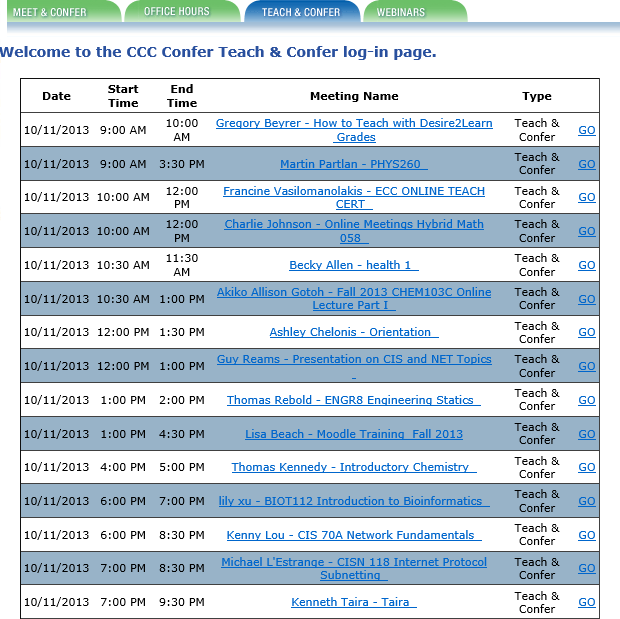
  1.  Live Instruction. In the CCCs, we call this "Teach and Confer" and literally hundreds of instructors use this tool every week to deliver live online instruction to students throughout the state (and, sometimes, the world). Classes are scheduled and links posted either within the college's Learning Course Management System or on the Confer Web site (see the schedule I captured from today's (October 11 list). As with Beth's case study example, we've had several instructors and researchers report on the effectiveness of this synchronous online instruction in reducing attrition, improving student success, and providing an effective means for students who might not otherwise be able to complete their educational goals to attend college and get their degrees. See, for example, Research on Online Spanish Classes, Case Study of Online vs. On-Campus, Grades and Attendance at Online Lectures, and Almost 95 Percent Retention.
2. Meetings. With 112 colleges spread across the state of California, the California Community Colleges is a large geographical system that requires thousands of meetings every week to coordinate activities, check on progress, communicate goals, convene groups and subgroups, and simply operate as a system.Travel costs for these thousands of meetings would be prohibitive, to say nothing of the expenses incurred for meeting space, food and beverage, A/V materials and other incidentals. I've added another screen shot of some of today's (10/11) meetings, which are not atypical: a group of math instructors, IT meetings, librarian meetings, counselor training, various committees, a work group on data governance, online educators from a single college, department meetings, several task forces, student organizations, and many more. There's no question that millions of dollars every year are saved in the CCCs because these and hundreds of other groups elect to meet online instead of traveling to campus, other campuses, or to hotels or office buildings to accomplish the same goals: collaborate and get work done.
3. Recorded Content. Students who miss class or who need to review lectures or class sessions have it easy in our system if instructors record their sessions with CCC Confer. Archived sessions are converted to MP4 format and posted to the system's YouTube channel and to 3C Media Solutions, where they can be viewed, added to playlists, embedded into syllabi or lesson plans, and even downloaded. Where captioning has been requested, captions are included and can be viewed from any device. To see how recorded lectures can be used to help students and instructors, see Using Confer to Extend Face-to-Face Classes, Archives for Students Who Miss Class, Face-to-Face Students Love Archives, Confer for Lecture Capture and Video Lectures, Archives Serve Diverse Learning Styles, or Using an Archive to Extend Class Time.
4. Online Conference. Not everyone can attend every conference for a variety of reasons. Budgets are short. Other duties conflict with the time and date of the conference. Space is restricted or there may be other physical limitations. With Confer, it's easy to capture, preserve, and distribute conference presentations to both participants and to non-participants who are nonetheless interested in the subject matter. Perhaps our best known conference of the year is the Online Teaching Conference, which captures roughly a third of its presentations this way and makes them available in real time to online attendees and as recorded videos for everyone else. We've done this for several other system-wide conferences with great success, and many organizations within the system have been able to offer online conferences using similar methods.
5. Mobile Web Conferencing. Now that Blackboard Collaborate has apps for both iOS and Android devices, attendance and participation in online classes and meetings has been extended to the mobile users in our system, making it even easier to connect while on the go.
6. Virtual Office Hours. Instructors need to meet with students, and these meetings often need to occur outside of class sessions as student are engaged in their studies, assignments, or research and need guidance or feedback.Some campuses and institutions require that these office hours be held in offices that
are physically located on campus, but those policies are changing as the realization grows that travel to campus is difficult and unnecessary, and that the virtual office is often better-equipped than the average faculty member's office (to say nothing of the office-sharing or office-less adjunct faculty member). The screen at left shows my capture of today's Office Hours schedule. As I looked these up, I was surprised to see so many on a Friday, but many also on Saturday and Sunday this weekend. This points out another great advantage to virtual office hours: since they don't occur on a campus, no other staff (custodians, campus security, etc.) are required to work so that the instructor can meet with his or her students. This makes it a more flexible and affordable service for the institution.
7. Student / Parent Orientation. As online education gains in popularity, the requirement that students enrolling in an institution physically attend an orientation session is becoming increasingly unpopular and suspect. Providing an online orientation for online students makes sense, as does the popular practice in our colleges to use Confer to orient students to online classes, the virtual classroom, the library resources available online, the availability of online tutors and other support services, and to their fellow classmates. So many students become acquainted with their college experience by meeting online via Confer, and it's also true that some of them graduate and attend commencement ceremonies online via Confer!
8. Remote Guest (Speaker / Virtual Field Trip). This is another natural implementation, and we've seen it used in very creative ways. One music instructor attended an opera and allowed her class to virtually attend from her computer, including an after-performance interview with the performers. Another instructor taught her northern California Spanish classes from Costa Rica, where she introduced locals and gave virtual tours from overseas. We've seen instructors from different institutions take turns guest lecturing in each others' classes, and conduct inter-institutional debates and presentations by students separated by physical miles but connected virtually by the Confer classroom.
9. Professional Development. The CCCs have practiced online professional development for years, and it is built into our infrastructure. Nearly every organization that serves the system uses Confer to
train employees and colleagues, and the fact that training sessions are recorded allows for new employees or transfers to catch up with their colleagues quickly by viewing the sessions online. A glance at today's and future Webinars shows the diversity of this popular service: a presentation on revitalizing education, training on online research methods, a session related to legislated adult education planning requirements, training on applications to four-year institutions, an orientation to the California College Guidance Initiative, Open Educational Resource training, a library training related to integrated library systems, a Webinar on how to flip the classroom, training on Board policy for course pre-requisites, software training for specific educational applications, and sexual harassment training. The money, time, and resources saved by having these trainings online instead of at physical locations is immeasruable.
10. Virtual Help Desk. By providing an easy way to connect with experts or support people online, colleges can better support students, especially (but not necessarily exclusively) online students. Counselors, librarians, and tutors have been especially attracted to this use of CCC Confer. For a sample playlist of testimonials from some of these professionals, follow this link.

Thanks to Beth for creating the list and to the many thousands of Confer users who've shown us how to use this tool to support education. Please feel free to share your own ways to make Web conferencing work.


Friday, August 2, 2013

Be There Now (or Later): How to Be Present When Your Students are Somewhere (or Somewhen) Else

In 1971, Ram Dass published Be Here Now, a life-changing book for many of the Boomer generation. The book emphasized spiritual truths and the admonition to be present at the only time that matters - now - and in the only place that matters - here. With quotes like "the next message you need is always right where you are," it brought many readers to an awakening based on the present moment.

Teachers in the virtual classroom often have a difficult time with the concept of "presence" and "here and now." They miss the eye contact with students that the traditional classroom provides, making it difficult to hold the audiences' attention or even to know when they are holding it. Non-verbal signals (facial expressions, body language, hand gestures) are also missing online. Students who wish to can get up and walk around, turn their backs on the instructor, switch screens, feed babies, etc.: there is little physical control granted to the instructor over the virtual classroom. Distractions - barking dogs, incoming text messages, e-mail, Facebook prompts, etc. - are difficult to control and have the potential to destroy instructor presence. We've all got horror (or humor) stories about that: one that recently appeared in The Chronicle's Wired Campus spoke of "barking dogs, wailing babies, and a naked spouse" as intruders in the virtual classroom.

The potential for disconnectedness or distraction is so great that virtual classroom instructors have to be proactive, just as the readers of Ram Dass's book were urged to "wake up" and "be here now." They must pay attention to what they're saying, how often they pause to ask questions and wait for answers, and how they recognize opportunities to solicit feedback and participation. They regularly check the class roster and call on students to contribute thoughts or materials. They know that injecting humor or surprise is an effective method for breaking the ice and getting everyone's attention. They find ways to personalize their presentation, often by using the Web cam judiciously to show themselves and/or their environment or by inserting personal pictures (of themselves, their garden, a pet) onto slides or whiteboards.

Where synchronous collaboration is possible (i.e., where you have an online audience now), it should be encouraged and planned for. I like to make my students believe that they can be called on anytime to do something - and then prove it by calling on them randomly and often. If more than three minutes go by without my pausing to engage my online audience, I'm in danger of losing both them and myself in the lecture, not the present moment. I like to insert a PAUSE slide about every 10 slides in my presentation to ensure that I use it and "wake up" to my audience. The chat back-channel is a great way to reinforce presence and engagement, as long as you pay attention to it and encourage student participation.

Vicki Davis cites 12 healthy habits to grow your online presence in her Cool Cat Teacher Blog:
  1. Share.
  2. Respond.
  3. Comment.
  4. Link Generously.
  5. Read (or Listen) Prolifically.
  6. Distribute Yourself.
  7. Beware of Flattery.
  8. Live Life Online and Off-line.
  9. Latch Key Your Legacy.
  10. Laugh (a lot).
  11. Take Every Presentation Seriously.
  12. Expect Criticism.
Be there!

Friday, June 28, 2013

Alone (or All One) Together Online: What Keeps Us Together in the Virtual Classroom

The constructivists maintain that social interaction leads to knowledge construction, higher order learning, and greater student success rates (i.e., achievement and completion). Students have to socially network in order for the neural network to do its thing and make connections between concepts and ideas. Sherry Turkle's wonderfully insightful book Alone Together is about, as she says, "how we are changed as technology offers us substitutes for connecting with each other face-to-face." The danger may be that if we use substitute (artificial) networking online, we may produce artificial learning or hamper the connections needed to enable real comprehension and mastery.

How do we build a community of learners from strangers who only meet online? Etienne Wenger prescribes course design elements that encourage interaction and reification (making things seem real). The use of real-time voice and video is one method the Confer instructor uses to deliver to students a sense of a real-time, articulate, caring, human. As Walsh et. al. reported in their study of Web conferencing learning communities, students may struggle with video and audio, but they prefer it to the alternative. "I think seeing someone on screen during the tutorial can keep you interested and makes the tutorial feel more interactive," says a Humanities student. Another student says, "I think the tutors who use this need to try and make it as interactive as possible ... [and to] input their own thoughts and ideas." Asked how the instructors could improve their use of the Web conferencing technology, students suggested:
  • "Find ways to ensure students participate in the live sessions"
  • "Develop and encourage methods for collaboration between students"
  • "Remember to use students' names to help make it a more personal experience"
McBrien and Jones cite similar observations from the students in their synchronous online learning study. "Talking through the microphone really helped me connect my thoughts, knowing that I could only express myself verbally. It also made me feel more in control of how I communicated my ideas because a large group of people weren't staring at me..." "Voting was great - great to see what everyone else in class felt - you don't always get that feedback." Their students reported these negatives in the virtual classroom:
  • Missing friends
  • Lack of support when presenting
  • Missing non-verbal gestures
One student observed that the class "needs to be planned more carefully and maybe tried the first session with all of the students in the classroom, not home."


We may be years away from taking these general suggestions and translating them into practical course design for the synchronous virtual classroom. As Mia Lobel et. al.  observe: "There is virtually no data describing how existing successful pedagogies, which are predicated on real-time interactive immediacy and skill practice, could be adapted to online learning environments. Much discussion and exploration is needed concerning the delivery of human relations skills online, when the pedagogy is based on group interaction, specifically active experiencing, concrete observation, abstract conceptualization and active practice and the content design is predicated on theories of group development, and observational and facilitation skills which necessitate participation and interaction."


Friday, January 18, 2013

Controlling Mayhem in the Synchronous Classroom

A seemingly ubiquitous commercial for an insurance company uses an evil, smug character called "Mayhem" to illustrate what can happen to change an ordinary day into a catastrophe. Mayhem falls through roofs, wrecks cars, spills coffee, drives lawnmowers through windows and boats, and diverts the attention of or misdirects drivers. All in all, he's a scary character.


There are moments when the Confer classroom may seem to have been invaded by Mayhem. A guest lecturer or speaker fails to connect or has audio problems, and your students begin to discuss things on their own that have nothing to do with the course. Students logging on have technical problems and insist on immediate attention; meanwhile, the rest of your online audience becomes irritable and even hostile in their chat remarks. Your network goes down in the middle of your lecture. A fire engine roars by your window, siren blaring. The software you're using freezes up. And so on.

Here are some suggestions for controlling the mayhem (and, no, these do not involve buying an insurance policy).

Roll With It

Understand that the nature of Web conferencing - like teaching itself - invites an element of mayhem. There are human factors, as in the traditional classroom, and these interact with (and sometimes exacerbate) the technical factors. If you use this technology often enough, something is sure to mess up at least once, and it will mess up when it's least convenient for you. 

When this happens, your reaction will be the most important factor in determining the outcome of your online session. Rage at the machine, roar at the outrage, or dissolve into a blubbering heap and you're certain to make the session a memorable failure. Roll with the punches and you at least have a chance of salvaging something from the shipwreck. If you remain upbeat and conversational, your audience will be more likely to wait out the problem with humor and patience.

I suggest that you deal with the problem directly instead of trying to mask or ignore it. If it's a human problem, confront the disrupters and enlist their help in restoring order. Coach your audience by explaining what you expect to see happen and providing alternatives to disrupting the session (e.g., call the help desk, take the discussion offline). Be quick to bring disruptive students on task, using the tact you would expect to receive if you were behaving similarly. When all else fails, boot them out. All the time you're doing this, keep a cool head and a smile (if possible). You're setting an example that your audience will find comforting: yes, there's a problem, and yes, I'm going to deal with it and move on. 

If the problem is technical, your best bet is to have a backup or fallback option. For example, about a month ago my campus network went down in the middle of a Webinar I was hosting. My remote presenter and the majority of our audience didn't experience the problem, but I was lost, temporarily. I have a backup network option (actually two), fortunately, and was able to re-join the session without anyone realizing that there had been a problem.

Know how to mute and un-mute your audience and speakers so that you can avoid the annoying disruptions that are otherwise beyond your control. Test your equipment, and have backups available, just in case. Deliver your slides to another moderator just in case you're prevented from presenting them. Have a way to communicate with at least one other participant without using the Confer tools (e.g., cell phone, IM, text message). 

Fortify Yourself

You can keep mayhem at bay by building a fortress that is impermeable. Get a room that can't be opened by co-workers, family members, etc. and put a "Do Not Disturb" sign on it. In selecting the room, try to make sure that it is well insulated from outside sounds and noises. If you're going to be on-camera, choose a non-distracting background. Clear your desk, get rid of the party hats, wash your face.

Check your network and phone status, and have a backup for each if possible. I like to use two computers whenever I'm presenting, and I also generally have each connected to a different network. 

Your audio equipment is important, and you can't easily handle an emergency if your audience can't hear you. Use a good microphone or headset and have substitute equipment, even if you're sure there's nothing wrong with the set you're using. Earlier this month, I used a high-end wireless microphone for a keynote speaker at a conference and was overjoyed to see the glowing reviews by online attendees at the sound quality. I used the same microphone the next day and got nothing but complaints until I plugged in the alternate equipment. 

If you have to use the bathroom, make sure you can get to it quickly from your spot and that it will be open. Likewise, prevent voice cracks by having water handy while you're speaking.

Warning: Danger, Will Robinson!

Let your students or online audience know that they're using technology that requires a certain amount of technical checking and may be susceptible to interruption. If possible, have them do the technical checking before joining the session, either by using a practice room or by running setup wizards in advance. Make this a requirement so that you're not greeted with indignant protests when they try to join the room with incompatible equipment.

You can spend some time orienting students to the environment and to acceptable behavior in your classroom. Show them how to participate, ask questions, raise hands, and communicate. Stress that you expect them to be open-minded and patient. 

Some instructors I know enlist the aid of students to perform some of the moderating tasks. They assign someone the duty of monitoring the chat, letting the instructor know when there's a question that needs answering, and some even assign students to provide the answers if possible. Another student will be asked to remind the instructor to start the recording, and another may have the job of looking for raised hands. This method - particularly if it's re-distributed over a semester - helps to keep students engaged and on-task.

An Ounce of Prevention

The worst way to come to a Confer session is on time. ALWAYS plan to be in the room at least 15 minutes early, so that you're able to deal with the unexpected in advance. It's also a good idea to have students come early, so that their problems can be fixed before the class actually begins. 

Design your class so that there are breaks where minor problems can be addressed or corrected. Have a plan of action, complete with re-actions, and keep planning right up to the time of the presentation. Sending e-mails to students to inform or remind them of the event and what you expect them to do in advance is always a good idea. Have a slide where emergency numbers are listed so that students will know what to do when all else fails. 

Know how to use private messaging so that you can deal with disrupters directly and quickly without embarrassing them. Calling out one of the audience for bad behavior has negative consequences that are very difficult to overcome. Be the adult in the room.

Your audience does not really expect a perfect world, even online. And they've all made mistakes or experienced situations where things didn't go as expected. A hint of mayhem won't send them into a panic, provided you deal with it cheerfully and appropriately. Your professionalism and commitment to getting them the materials and content you're paid to deliver will impress them.

Friday, December 7, 2012

Best Practices for Synchronous Online Instruction: An Update


Slideshare recently contacted me to say that my presentation on best practices for synchronous e-learning had attracted more than 1,000 viewers. I know they meant well, but - instead of making me happy - I felt terrible! The presentation used a ton of embedded videos to make its points, and when I sent the slides to the site, none of the videos were included.

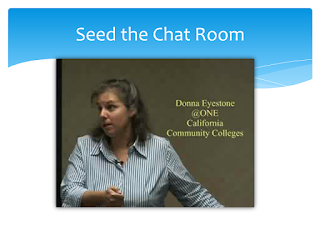
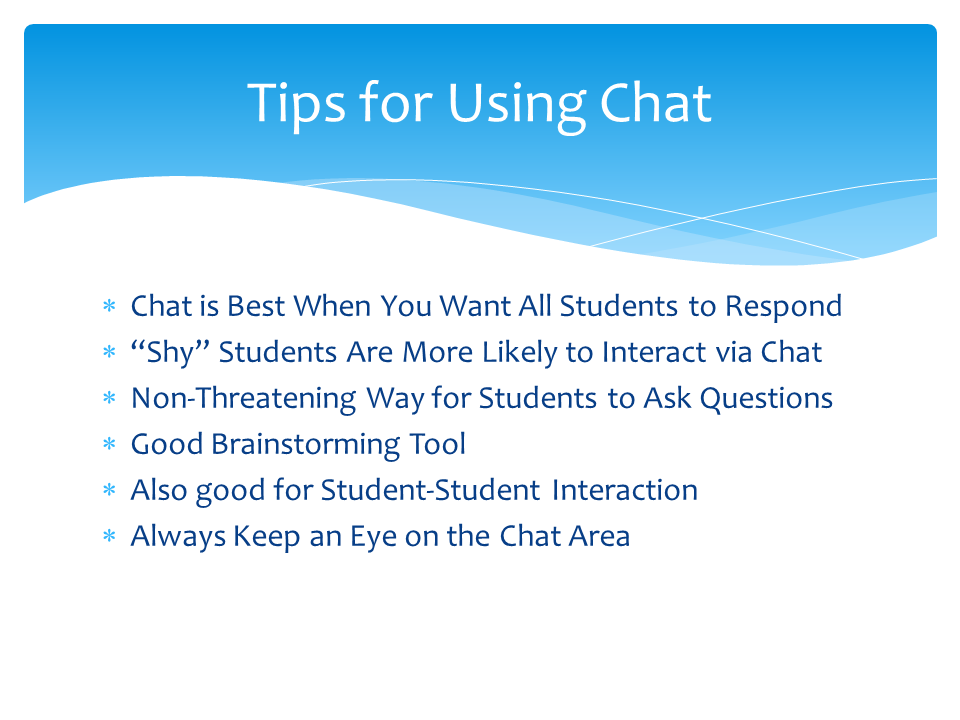
So here's my correction for those who may still be interested: the slides and the videos, together again. (To view the videos, click on the relevant images.)


Click to view


Click to view

Click to view

Click to view


Get Twitter Fan Box Widget