Showing posts with label distance educaiton. Show all posts

Friday, March 22, 2013

What DOESN'T Work in the Virtual Classroom?

I've written a lot about the benefits of the virtual classroom and included many examples of what works well in this environment. In the 10+ years of CCC Confer, we've seen exponential growth in popularity among faculty and students, and we've watched Web conferencing technology become more and more reliable and stable for our thousands of users.

But it wouldn't be accurate or fair to pretend that Web conferencing is always  the best option or that it is always the best way to reach students and deliver online instruction. In fact, there's evidence to suggest that Web conferencing provides some barriers for students and instructors, which must be recognized and overcome for a successful experience and for effective instruction to take place. For example, I just previewed an article in the June 2013 Journal of Computing Sciences in College entitled, "Under What Conditions Does Web Conferencing Inhibit Learning in a Computer Science Classroom?" The authors - Jami Cotler of Siena College and Dima Kassab and Xiaojun Yuan of SUNY-Albany - drew conclusions from two lectures (one delivered face-to-face and one delivered online via Web conferencing) and students' reactions to the experience of these lectures. I'll reserve comment on the methodology or validity of this study, but I'm interested in the students' perceptions.

Distractions. In the Cotler study, 31% of the students reported problems with distractions during the virtual lecture. The nature of these distractions were not disclosed, but we can guess that they may have involved the typical distractions online students encounter: e-mail messages, tweets, Facebook posts, instant messages, and other Web excursions. It may also be that these students found the Web conferencing interface itself distracting, with its chat window, video, whiteboard, etc. The face-to-face classroom also has distractions, of course, but eye contact with the instructor is often inhibition enough for students to block them off and pay attention to the lecturer.

To help students overcome these distractions, the experienced Confer instructor gives guidelines to students before their first online class session and even at the beginning of the session. Disable notifications from your online applications (noises, signals, pop-ups): they will interfere with your concentration. Some instructors even provide specific instructions for turning off, say, Facebook notifications. And, while the class is meeting online, it's good practice to keep the students alert by mixing up the delivery.

Engagement. Cotler's students reported that they were 38% less engaged in the virtual classroom than in the face-to-face environment. Oddly, though, 88% "felt they were able to participate during the [Web conferencing] lecture" and 56% "felt highly engaged in the course materials and the course activities" in the online classroom. So the perception of less engagement may have been related to distractions or some other subjective factor. Many (69%) of the students reported "less connection to the instructor" when using the virtual classroom. However, they reported using the whiteboard and chat features, and most of the students claimed to have reached out to either another student or the instructor during the online session.

We know from long experience that keeping students engaged in the virtual classroom is more challenging than in the traditional environment. You can't see all of your students, and you're not going to be able to validate all of their behavior all of the time. Your sense of control online is compromised because of the distance between you and the "desks" in front of you. But you can keep students engaged by doing some extra work: preparing breaks in which students provide examples, express opinions, or vote on issues. Work in assessments or chat activities, and use breakout rooms to divide a large class into manageable small groups where it's harder for students to hide or let others do all the work. Several of my blog posts provide examples of these strategies.

Unfamiliarity with Technology. I was surprised to read in Cotler's study that unfamiliarity with technology accounted for only 13% of the reported problems with the virtual classroom. Half of all the students "stated that it was convenient and that they like that they could remain in the comfort of their home," and an amazing 81% reported "feeling less stressed about tasks accomplished during the [Web conferencing] session in comparison to the face-to-face session." So technophobia (or at least fear of synchronous online interaction), while not dead, is on the wane with today's students.

It's a good idea to orient students to the virtual classroom before you make them do something in it. This can happen during a "practice" session, in a "sandbox" (we offer several on the CCC Confer Web site), or via training materials (videos, slides, documents) you provide for them. Given these results and the increasing popularity of synchronous online rooms (Skype, Google Hangouts, etc.), it may be just as important that you orient yourself to the virtual classroom and feel comfortable showing its features to your students.

What doesn't work in the virtual classroom? Mainly, not having a plan to use it!

Friday, December 7, 2012

Best Practices for Synchronous Online Instruction: An Update


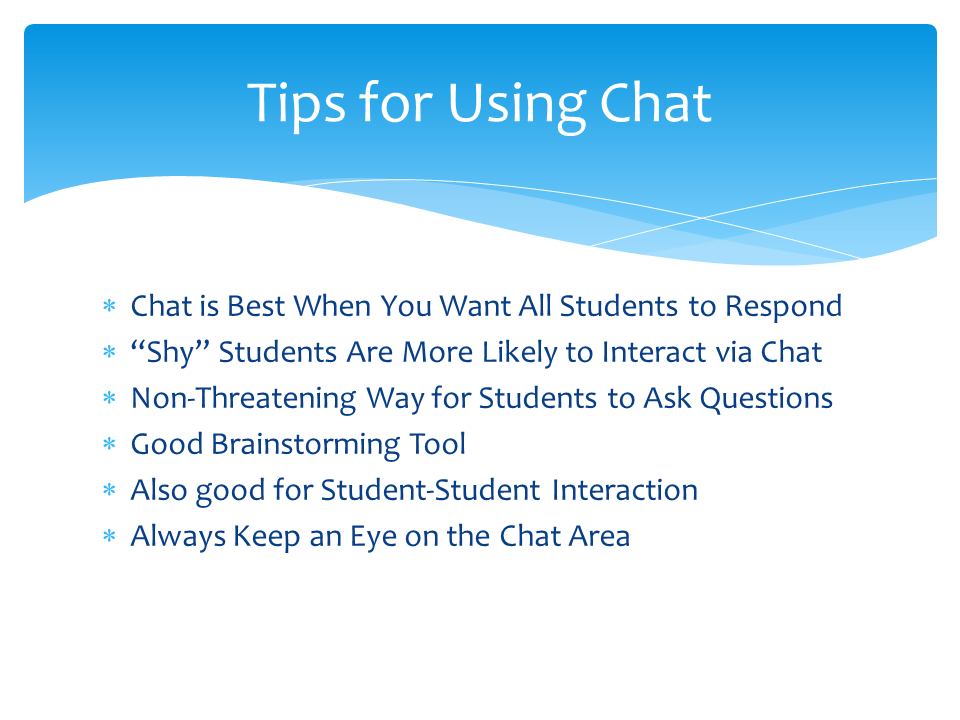
Slideshare recently contacted me to say that my presentation on best practices for synchronous e-learning had attracted more than 1,000 viewers. I know they meant well, but - instead of making me happy - I felt terrible! The presentation used a ton of embedded videos to make its points, and when I sent the slides to the site, none of the videos were included.

So here's my correction for those who may still be interested: the slides and the videos, together again. (To view the videos, click on the relevant images.)


Click to view


Click to view

Click to view

Click to view


Friday, April 8, 2011

When Travel Budgets Disappear, Teamwork Grows

"Too often travel, instead of broadening the mind, merely lengthens the conversation." -  Elizabeth Drew
World Wide Web of Informatin
"The most important trip you may take in life is meeting people halfway." - Henry Boye 

Colleges and organizations throughout the state and country are slashing travel budgets to save money. We've done the same thing here at CCC Confer, and I have to admit that I don't miss the hotels, restaurant tabs, tips, airports, toll roads, car rentals, packing and unpacking, lost items, or germy travel environments as much as I thought I might. And I'm getting more done - with more people - by staying in my office and meeting with them virtually. Now that more people are foregoing statewide trips, I'm getting more opportunities to introduce them to the quickest, easiest, and most effective way to bring teams from different geographical locations together. 

I recently helped to host an event at a local college that required speakers and attendees to drive to the event, food to be prepared and served, tables to be set up, equipment to be arranged, and a sound and video system to be tested. It took two hours to set up the room, ensure that the microphones and projector were working properly, skirt and decorate the tables, and work with the caterers. The keynote speakers each drove more than 100 miles to attend, so they also needed two hours advance time to get to the meeting and another two hours afterward to drive home.

For the same event, if it were to be held virtually, it would require less than five minutes to order the meeting and send e-mail invitations to all attendees. Loading the speakers' presentation might take another two minutes, and testing the audio connections might add another minute. In less than ten minutes, we'd be ready to go, and no one would have had to leave the home or office!

In the large room where my local college's event was held, there were corners of the room where it was difficult to see and read the speakers' slides, and even the P-A system was unable to bring an equally clear signal to all participants. The sunlight streaming through the windows reduced the visual clarity of the content, making it even harder to make out all of the images on the screen. In a Confer presentation, everyone sees exactly the same images and hears the same audio signals: there are no "cheap seats" in this environment and no problems with lighting. One of the speakers, anticipating potential problems with the room and presentation, brought more than 100 paper copies of his presentation, which had to be distributed throughout the room. In the Confer meeting room, a single click distributes a file instantly to all participants (even those who aren't in attendance but are able to view the archive later). 

I'm not celebrating the budget crisis or decrying the virtues of travel. After all, I've got a collection of school gear from California colleges that can only be complete if I'm able to visit more schools. But there's no question that we waste a lot of time and money with face-to-face meetings that can easily be saved by taking the meetings online. With a good agenda, a prepared moderator, and motivated team members, you can accomplish more in a virtual meeting than is possible in most face-to-face conferences. I'm just happy that so many of my colleagues are discovering this for themselves and coming away from Confer experiences pleasantly surprised.

Friday, October 9, 2009

Learning to Interact Online: It's a Progression

"It is assumed by academic institutions that if online courses and programs are offered, teachers will know how to teach in that environment, and more importantly, students will know how to learn or engage with that material. Our experience is that the opposite is true. Faculty need training and assistance in making the transition to the online environment, but students also need to be taught how to learn online. Learning through the use of technology takes more than mastery of a software program or comfort with the hardware being used. It takes an awareness of the impact that this form of learning has on the learning process itself. As more and more institutions and their instructors enter the cyberspace classroom and encounter both successes and difficulties in the process, they are coming face-to-face with the realities of online teaching and asking more, not fewer, questions about how to make the transition successfully." - Rena Paloff and Keith Pratt, Lessons from the Cyberspace Classroom.

I've had occasion to notice the progressions that instructors make as they master the tools of educational technology and apply them to pedagogical tasks. For example, a teacher who comes to Confer for the first time has an interactive whiteboard, which is the most obvious tool for presenting content to students. This instructor will begin by using the whiteboard only as a visual support, presenting static slides and accompanying them by narration. The whiteboard becomes, in essence, the online equivalent of a projector, and there is little or no effort to use it for conceptual development, interaction with students, or as a discussion stimulus.

After time, some instructors become comfortable enough with the Confer environment to use the whiteboard to solicit student responses. He/she may use the pointing tool to highlight some of the content, or allow students to draw or annotate the online slides. More and more, this instructor will use the whiteboard to challenge students to think by means of visual stimuli and verbal coaching.

Eventually, these instructors develop a new way of thinking about the whiteboard and its usefulness. They see ways to use it as an integral part of any online session with students, and they try to integrate its inherent interactivity into their lesson plans. They have developed an awareness both of the available techniques for annotation, drawing, and manipulating screen content and objects, and have become fluent in using these techniques. Now, they make sure that students - individually or collectively - react to and interact with the whiteboard content. They drag and drop students' annotations to match concepts, hide or reveal certain objects to engage questions, match objects or terms on the screen, or use freehand drawings to illustrate improvements or new approaches. The whiteboard becomes less and less a screen for displaying static content and increasingly a tool for prompting discussion, eliciting responses, developing ideas, and testing hypotheses. These instructors often develop their own content specifically for the whiteboard rather than displaying ready-made PowerPoints.

Gilly Salmon calls this latter kind of teaching "e-moderating" and maintains that it is the key to teaching and learning online. Salmon's five-stage model describes the ways both instructors (e-moderators) and learners progress in the online classroom: 1. Access and Motivation, in which the first challenges are to successfully login and make the visit worth the trouble; 2. Socialization, in which the challenges are to adapt to individual learner needs, provide bridges between old skills and new ones, and allow for individualized expression; 3. Information Exchange, which invites challenges and participation, encourages group tasks and roles, and is characterized by often "messy" communications; 4. Knowledge Construction, with much questioning, discussion, challenging, motivating, and interaction in order to build understanding; and 5. Development, in which the learners become independent critical thinkers, able to inject humor into the process, and able to reflect on what and how they have learned online.

Thankfully, I've been able to watch some of this progression among our Confer users, and to benefit from their experiences and insights. As these e-moderators emerge in our learning community, they'll help all of us to understand the developing online conferencing environment and how it can best enable learning and growth.

Friday, September 11, 2009

Learning to Learn

"The single most important thing you can learn in the ‘flat’ world is the ability to learn how to learn - to constantly absorb, and teach yourself, new ways of doing old things or new ways of doing new things... To learn how to learn, you have to love learning - or you have to at least enjoy it - because so much learning is about being motivated to teach yourself. And while it seems that some people are just born with that motivation, many others can develop it or have it implanted with the right teacher." - Thomas L. Friedman,
The World is Flat.

The world is changing at a rapid pace, and, as Eric Hoffer said, "in times of change, learners inherit the Earth, while the learned find themselves beautifully equipped to deal with a world that no longer exists." We cannot accurately predict what skills our students will need or jobs they will be required to do in future years. But we can - and must! - teach them to value learning, and to become adept at self-instruction.

One way to do this in the online classroom is to engage the class in a discussion of what learning is about. You might begin with the quote that opens this article, placing it on the whiteboard and inviting comments from students. You could then use the Web tool to take students to this synopsis of Friedman's book - or share the file using the file sharing tool.

Try some pointed questions, either with the entire class or by assigning them to groups in breakout rooms. What does "flat world" mean? What's the difference between "learning" and "learning to learn"? In a global workplace, why is it important to learn to learn?

Once this concept has been discussed and appreciated, tune in to your students' own abilities and preferences for learning. Try using the Polling tool to identify students' preferences for learning (e.g., A, Group work; B, Reading the text; C, Listening to lectures and taking notes; D, Discussion). Or use the VARK questionnaire to identify learning styles. These will help students identify their own preferences for taking in information visually, aurally, by reading and writing, kinesthetically, or multimodally. Once they've completed these questionnaires, take them to the VARK Helpsheets so they can plan their own "learning to learn" strategies.

Doing this early in the semester is a great way to prepare students - not only for your class, but for a lifetime of learning.

Friday, July 31, 2009

Prompt Feedback


"Knowing what you know and don't know focuses learning. Students need appropriate feedback on performance to benefit from courses. When getting started, students need help in assessing existing knowledge and competence. In classes, students need frequent opportunities to perform and receive suggestions for improvement. At various points during college, and at the end, students need chances to reflect on what they have learned, what they still need to know, and how to assess themselves." (Chickering and Gamson)

If your students come to the online classroom with no clues from you about how well (or poorly) they're doing, they may well wonder why they're coming at all. There are plenty of available tools for impromptu and/or formal assessment, and you should make it a point to use them often.

The breakout rooms, for example, are a perfect resource for allowing individuals or groups to complete self-paced exercises you make available or to take quizzes you administer or deliver to the rooms. Another innovative use of breakout rooms, suggested by Clark and Kwinn, is to set up trios in breakout rooms for role-play exercises, with one of the three acting as an observer. "Guidelines for conducting the role play can be posted on the white board, and the observer can take notes in chat as the role play proceeds and give feedback via audio or white board following the role play exercise.” Note that this technique gives the prompt feedback delivery method to the students, rather than to the instructor.

The chat tool is effective for informal, individualized feedback during an online session. You can send private messages of encouragement or admonishment without distracting the other students or embarrassing your targets. Even a public "Bravo!" in the chat window allows students to know that you're paying attention and that they're on the right track. Another feature of the chat tool is that it can provide your students with a non-threatening way to pose questions or communicate other needs with you. Students who are reluctant to speak up in class sometimes find it easier to communicate in the chat area, and it's almost always true that if one student aks a question, others have it in their minds.

The use of polls is a terrific option for providing prompt feedback. Although you generally have to prepare your polls ahead of time, it doesn't really take much more than a few seconds to type a poll on the whiteboard and deliver it to your students ad hoc. It's often a good idea to hide the polling results until all participants have responded to ensure honest feedback from the students. You should also remember that you can guage your students even without structured poll responses (i.e., "yes/no" or "A, B, C, D, E"). The whiteboard can be used to pose a question and allow students to type their own responses - either on the whiteboard itself or in the chat area. Doing this often - throughout the class - helps ensure that you're on track with your students and that they're keeping up with you. Remember, though: don't ask a question and ignore the results. Students don't appreciate being ignored.

The emoticons (smiley face, frown, applause, etc.) are also useful feedback tools. You can use them to silently appraise your students, and you can also allow your students to use them to give you a "pulse" on the class. Jonathan Finkelstein advises, “When someone else is speaking, have your mouse near the emotion indicators. Get in the habit of clicking on an emoticon as a participant is speaking or typing to express your reaction. These real-time cues can provide the encouragement and confidence a learner needs.”

Chopeta Lyons suggests that at the end of a class session, use an "instant feedback" whiteboard to allow students to reflect and analyze. Divide the screen down the middle and put a plus on one side and a minus on the other. Students can then type comments anonymously in either or both columns.

How about you?


Get Twitter Fan Box Widget