Showing posts with label synchronous vs. asynchronous. Show all posts

Friday, May 2, 2014

Marshall McLuhan and Web Conferencing: What Message Is Our Medium?

I've just read a fascinating chapter by Mark A. McCutcheon which reflects on Web conferencing, Marshall McLuhan's thinking, and intellectual property issues. The print version appears in McLuhan's Global Village Today: Transatlantic Perspectives (Pickering and Chatto, 2014, ISBN-13:9781848934610) and a "pre-copyedited, pre-print version" is available here. The author covers more than I can describe here (and does a better job than I can), but I'd like to explore a few points specifically related to the Web conferencing medium.

McCutcheon was asked to present a paper at a conference which, as it turned out, he could not physically attend. Instead, he used Web conferencing to present his paper. But what does that mean, he asks? "I was neither present at the event, nor presenting a paper, as denoted by academic tradition, so much as orchestrating an audio-visual 'presentation,' at once a performance and a recording" (emphasis added). He presented "a digital slideshow, video images of my talking head and of the room of delegates..., and my microphoned voice, as I spoke the text of my paper." The session was recorded and can be "called up, replayed and paused, and distributed as a link with a password."

Web conferencing, says McCutcheon, "blurs the lines between performance and recording, between presence and representation." He goes on to describe a "dubject" created by this kind of technology, "assembled through technologies of mechanical reproduction, and distributed through networks of electronic distribution that blur the boundaries between ... consumer and commodity, the organic self and technological others...." We who use Web conferencing and similar technologies to reach distant audiences and/or future audiences are using "dubjection": "a technological doubling and spacing of the self."

He describes the spacing vividly:

On the day of the proceedings, I wasn't at Marburg, or at AU... If the conjunction at connotes a sense of place, of position - a humanistic, common-sense expression of live, embodied presence - then in that sense, I was somewhere, of course: I was at a neighbour's house. But that place became neither here nor there, so to speak, for the duration of my attendance at the conference. Would it be more precise to say that, at that time, I was "@" a number of spaces at the same time?... My image and voice projected into the Marburg town hall, racing unplumbed lengths of cable and unknown airborne frequencies, translated into strings of ones and zeroes as dense and complex as protein chains. Routed and rerouted through data centres and ISP addresses across the Atlantic (and quite possibly elsewhere), my dubjected presence traversed any number of relays and channels in the global IT network, less a village, certainly, than a vast electric ocean.
 All of us who have practiced Web conferencing are familiar with this disconnect. We're "here" and "there" at the same time, and our audience is "there" but we want them to be "here" while we're communicating with them. We want to see them and gauge their reactions, inspire them, motivate them, connect with them. The technology allows us to do some of that - more than we expected, in many cases - but it can't (yet) hide the "dubjection" effect. McLuhan said once that "media are a means of extending and enlarging our organic sense lives into the environment." That's why we confer (Confer) through Web conferencing.

The medium (Web conferencing) may well be the message. McLuhan proclaimed famously that "it is the medium that shapes and controls the scale and form of human association and action" (p. 9) and that "the 'message' of any medium or technology is the change of scale or pace or pattern that it introduces into human affairs" (p. 8). To ignore the change of scale, pace, and pattern that the virtual classroom engenders is to disconnect with the experience and the audience(s) we're trying to address. This evolving medium has the capacity to enrich our perceptions, insights, connections, and understanding of one another, provided we exploit its potential and help students and audiences to adapt to it.

Friday, January 17, 2014

The Web Conferencing Skill Set

"Ah, mastery... what a profoundly satisfying feeling when one finally gets on top of a new set of skills... and then sees the light under the new door these new skills can open, even as another door is closing." - Gail Sheehy

We've spent a lot of time in this blog discussing the tools of Web conferencing and some of the practices which have proved most effective in using those tools. As with any tool set, the level of skills in the use of these tools is a significant variable in their successful implementation. Instructors and students come to the virtual classroom with different skill levels, personalities, and experiences, all of which play a role in determining the learning climate.

Valaitas et. al. studied instructors who used Web conferencing to teach health sciences. By identifying personality types in their instructor sample - "Pragmatists, Positive Communicators, and Shy Enthusiasts" - they were able to differentiate approaches to the use of and acquisition of skills in the tools of Web conferencing. The "positive communicators" in this group "strongly disagreed" with the statement "The application sharing tool is a bit confusing for participants and presenters" and "were not challenged by the application-sharing feature." By contrast, the "shy enthusiasts" preferred the "ability to interact online by responding to multiple-choice or open-ended questions." The "pragmatists" in this sample did not show a particular proclivity to any particular tool, although all three groups were generally positive about the technology. This suggests that skills and personality may be inter-related in this arena.

The "digital natives" in modern classrooms may not be quite so "native" in the Web conferencing environment. Kennedy et. al. report that only a third of students surveyed had used a Web conferencing tool; two-thirds had not. It's clearly not safe to assume that your students know this software and will be able to help you find your way around.

Matt Bower points out the need for and variability of skills in this environment in his three-semester study of Web conferencing used for instruction. He observed "four levels of online collaborative competencies... operational, interactional, managerial, and design." He also notes that "the relative importance of students and teachers possessing the different levels of competencies depended on the degree of interactivity in the learning processes." The instructors who designed into their lesson plans greater interactivity increased the potential for misuse of the tools and the need for competencies to manage the interaction, operate the tools, and interact successfully. "Firstly, there are several tools to master; secondly, different tools need to be selected depending on communication requirements; thirdly, the affordances of tools in combination requires consideration; and fourthly, decisions about how to use tools often need to be made in real time. Failure to understand one subtle feature of a tool or its use can have a crippling impact on the learning episode, amplifying the importance that users have developed technical and collaborative competencies...."

Friday, October 11, 2013

Ten Ways Web Conferencing Works in Education

I came across Beth Gallob's slideshow (below) earlier this week and was inspired to elaborate on it with our experiences at CCC Confer. We are always discovering new ways to use this great tool by watching and hearing from our users - instructors, administrators, trainers, even students. These ten suggestions are the "easy finds" in the great barrel of options Web conferencing provides. Share your own!


Top 10 Ways to Use Blackboard Collaborate from Beth Gallob

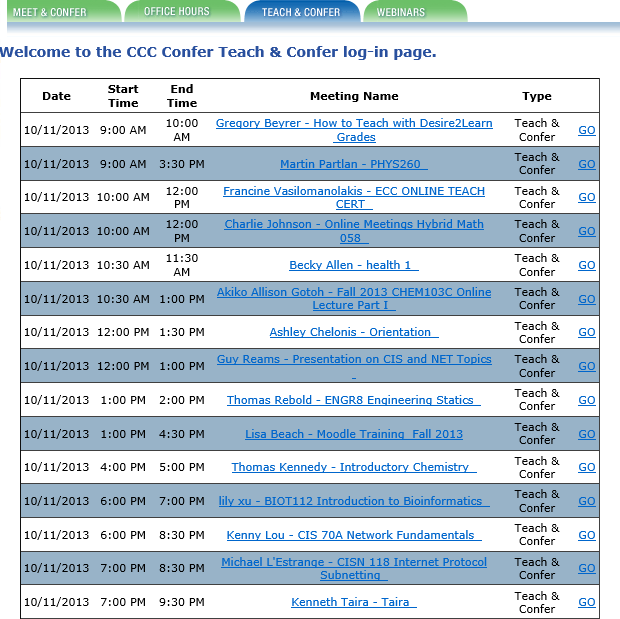
  1.  Live Instruction. In the CCCs, we call this "Teach and Confer" and literally hundreds of instructors use this tool every week to deliver live online instruction to students throughout the state (and, sometimes, the world). Classes are scheduled and links posted either within the college's Learning Course Management System or on the Confer Web site (see the schedule I captured from today's (October 11 list). As with Beth's case study example, we've had several instructors and researchers report on the effectiveness of this synchronous online instruction in reducing attrition, improving student success, and providing an effective means for students who might not otherwise be able to complete their educational goals to attend college and get their degrees. See, for example, Research on Online Spanish Classes, Case Study of Online vs. On-Campus, Grades and Attendance at Online Lectures, and Almost 95 Percent Retention.
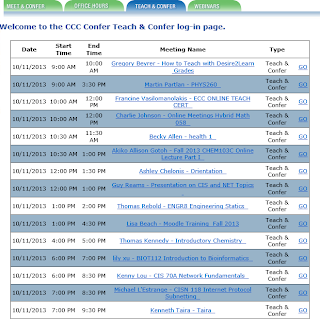
2. Meetings. With 112 colleges spread across the state of California, the California Community Colleges is a large geographical system that requires thousands of meetings every week to coordinate activities, check on progress, communicate goals, convene groups and subgroups, and simply operate as a system.Travel costs for these thousands of meetings would be prohibitive, to say nothing of the expenses incurred for meeting space, food and beverage, A/V materials and other incidentals. I've added another screen shot of some of today's (10/11) meetings, which are not atypical: a group of math instructors, IT meetings, librarian meetings, counselor training, various committees, a work group on data governance, online educators from a single college, department meetings, several task forces, student organizations, and many more. There's no question that millions of dollars every year are saved in the CCCs because these and hundreds of other groups elect to meet online instead of traveling to campus, other campuses, or to hotels or office buildings to accomplish the same goals: collaborate and get work done.
3. Recorded Content. Students who miss class or who need to review lectures or class sessions have it easy in our system if instructors record their sessions with CCC Confer. Archived sessions are converted to MP4 format and posted to the system's YouTube channel and to 3C Media Solutions, where they can be viewed, added to playlists, embedded into syllabi or lesson plans, and even downloaded. Where captioning has been requested, captions are included and can be viewed from any device. To see how recorded lectures can be used to help students and instructors, see Using Confer to Extend Face-to-Face Classes, Archives for Students Who Miss Class, Face-to-Face Students Love Archives, Confer for Lecture Capture and Video Lectures, Archives Serve Diverse Learning Styles, or Using an Archive to Extend Class Time.
4. Online Conference. Not everyone can attend every conference for a variety of reasons. Budgets are short. Other duties conflict with the time and date of the conference. Space is restricted or there may be other physical limitations. With Confer, it's easy to capture, preserve, and distribute conference presentations to both participants and to non-participants who are nonetheless interested in the subject matter. Perhaps our best known conference of the year is the Online Teaching Conference, which captures roughly a third of its presentations this way and makes them available in real time to online attendees and as recorded videos for everyone else. We've done this for several other system-wide conferences with great success, and many organizations within the system have been able to offer online conferences using similar methods.
5. Mobile Web Conferencing. Now that Blackboard Collaborate has apps for both iOS and Android devices, attendance and participation in online classes and meetings has been extended to the mobile users in our system, making it even easier to connect while on the go.
6. Virtual Office Hours. Instructors need to meet with students, and these meetings often need to occur outside of class sessions as student are engaged in their studies, assignments, or research and need guidance or feedback.Some campuses and institutions require that these office hours be held in offices that
are physically located on campus, but those policies are changing as the realization grows that travel to campus is difficult and unnecessary, and that the virtual office is often better-equipped than the average faculty member's office (to say nothing of the office-sharing or office-less adjunct faculty member). The screen at left shows my capture of today's Office Hours schedule. As I looked these up, I was surprised to see so many on a Friday, but many also on Saturday and Sunday this weekend. This points out another great advantage to virtual office hours: since they don't occur on a campus, no other staff (custodians, campus security, etc.) are required to work so that the instructor can meet with his or her students. This makes it a more flexible and affordable service for the institution.
7. Student / Parent Orientation. As online education gains in popularity, the requirement that students enrolling in an institution physically attend an orientation session is becoming increasingly unpopular and suspect. Providing an online orientation for online students makes sense, as does the popular practice in our colleges to use Confer to orient students to online classes, the virtual classroom, the library resources available online, the availability of online tutors and other support services, and to their fellow classmates. So many students become acquainted with their college experience by meeting online via Confer, and it's also true that some of them graduate and attend commencement ceremonies online via Confer!
8. Remote Guest (Speaker / Virtual Field Trip). This is another natural implementation, and we've seen it used in very creative ways. One music instructor attended an opera and allowed her class to virtually attend from her computer, including an after-performance interview with the performers. Another instructor taught her northern California Spanish classes from Costa Rica, where she introduced locals and gave virtual tours from overseas. We've seen instructors from different institutions take turns guest lecturing in each others' classes, and conduct inter-institutional debates and presentations by students separated by physical miles but connected virtually by the Confer classroom.
9. Professional Development. The CCCs have practiced online professional development for years, and it is built into our infrastructure. Nearly every organization that serves the system uses Confer to
train employees and colleagues, and the fact that training sessions are recorded allows for new employees or transfers to catch up with their colleagues quickly by viewing the sessions online. A glance at today's and future Webinars shows the diversity of this popular service: a presentation on revitalizing education, training on online research methods, a session related to legislated adult education planning requirements, training on applications to four-year institutions, an orientation to the California College Guidance Initiative, Open Educational Resource training, a library training related to integrated library systems, a Webinar on how to flip the classroom, training on Board policy for course pre-requisites, software training for specific educational applications, and sexual harassment training. The money, time, and resources saved by having these trainings online instead of at physical locations is immeasruable.
10. Virtual Help Desk. By providing an easy way to connect with experts or support people online, colleges can better support students, especially (but not necessarily exclusively) online students. Counselors, librarians, and tutors have been especially attracted to this use of CCC Confer. For a sample playlist of testimonials from some of these professionals, follow this link.

Thanks to Beth for creating the list and to the many thousands of Confer users who've shown us how to use this tool to support education. Please feel free to share your own ways to make Web conferencing work.


Friday, August 2, 2013

Be There Now (or Later): How to Be Present When Your Students are Somewhere (or Somewhen) Else

In 1971, Ram Dass published Be Here Now, a life-changing book for many of the Boomer generation. The book emphasized spiritual truths and the admonition to be present at the only time that matters - now - and in the only place that matters - here. With quotes like "the next message you need is always right where you are," it brought many readers to an awakening based on the present moment.

Teachers in the virtual classroom often have a difficult time with the concept of "presence" and "here and now." They miss the eye contact with students that the traditional classroom provides, making it difficult to hold the audiences' attention or even to know when they are holding it. Non-verbal signals (facial expressions, body language, hand gestures) are also missing online. Students who wish to can get up and walk around, turn their backs on the instructor, switch screens, feed babies, etc.: there is little physical control granted to the instructor over the virtual classroom. Distractions - barking dogs, incoming text messages, e-mail, Facebook prompts, etc. - are difficult to control and have the potential to destroy instructor presence. We've all got horror (or humor) stories about that: one that recently appeared in The Chronicle's Wired Campus spoke of "barking dogs, wailing babies, and a naked spouse" as intruders in the virtual classroom.

The potential for disconnectedness or distraction is so great that virtual classroom instructors have to be proactive, just as the readers of Ram Dass's book were urged to "wake up" and "be here now." They must pay attention to what they're saying, how often they pause to ask questions and wait for answers, and how they recognize opportunities to solicit feedback and participation. They regularly check the class roster and call on students to contribute thoughts or materials. They know that injecting humor or surprise is an effective method for breaking the ice and getting everyone's attention. They find ways to personalize their presentation, often by using the Web cam judiciously to show themselves and/or their environment or by inserting personal pictures (of themselves, their garden, a pet) onto slides or whiteboards.

Where synchronous collaboration is possible (i.e., where you have an online audience now), it should be encouraged and planned for. I like to make my students believe that they can be called on anytime to do something - and then prove it by calling on them randomly and often. If more than three minutes go by without my pausing to engage my online audience, I'm in danger of losing both them and myself in the lecture, not the present moment. I like to insert a PAUSE slide about every 10 slides in my presentation to ensure that I use it and "wake up" to my audience. The chat back-channel is a great way to reinforce presence and engagement, as long as you pay attention to it and encourage student participation.

Vicki Davis cites 12 healthy habits to grow your online presence in her Cool Cat Teacher Blog:
  1. Share.
  2. Respond.
  3. Comment.
  4. Link Generously.
  5. Read (or Listen) Prolifically.
  6. Distribute Yourself.
  7. Beware of Flattery.
  8. Live Life Online and Off-line.
  9. Latch Key Your Legacy.
  10. Laugh (a lot).
  11. Take Every Presentation Seriously.
  12. Expect Criticism.
Be there!

Friday, June 28, 2013

Alone (or All One) Together Online: What Keeps Us Together in the Virtual Classroom

The constructivists maintain that social interaction leads to knowledge construction, higher order learning, and greater student success rates (i.e., achievement and completion). Students have to socially network in order for the neural network to do its thing and make connections between concepts and ideas. Sherry Turkle's wonderfully insightful book Alone Together is about, as she says, "how we are changed as technology offers us substitutes for connecting with each other face-to-face." The danger may be that if we use substitute (artificial) networking online, we may produce artificial learning or hamper the connections needed to enable real comprehension and mastery.

How do we build a community of learners from strangers who only meet online? Etienne Wenger prescribes course design elements that encourage interaction and reification (making things seem real). The use of real-time voice and video is one method the Confer instructor uses to deliver to students a sense of a real-time, articulate, caring, human. As Walsh et. al. reported in their study of Web conferencing learning communities, students may struggle with video and audio, but they prefer it to the alternative. "I think seeing someone on screen during the tutorial can keep you interested and makes the tutorial feel more interactive," says a Humanities student. Another student says, "I think the tutors who use this need to try and make it as interactive as possible ... [and to] input their own thoughts and ideas." Asked how the instructors could improve their use of the Web conferencing technology, students suggested:
  • "Find ways to ensure students participate in the live sessions"
  • "Develop and encourage methods for collaboration between students"
  • "Remember to use students' names to help make it a more personal experience"
McBrien and Jones cite similar observations from the students in their synchronous online learning study. "Talking through the microphone really helped me connect my thoughts, knowing that I could only express myself verbally. It also made me feel more in control of how I communicated my ideas because a large group of people weren't staring at me..." "Voting was great - great to see what everyone else in class felt - you don't always get that feedback." Their students reported these negatives in the virtual classroom:
  • Missing friends
  • Lack of support when presenting
  • Missing non-verbal gestures
One student observed that the class "needs to be planned more carefully and maybe tried the first session with all of the students in the classroom, not home."


We may be years away from taking these general suggestions and translating them into practical course design for the synchronous virtual classroom. As Mia Lobel et. al.  observe: "There is virtually no data describing how existing successful pedagogies, which are predicated on real-time interactive immediacy and skill practice, could be adapted to online learning environments. Much discussion and exploration is needed concerning the delivery of human relations skills online, when the pedagogy is based on group interaction, specifically active experiencing, concrete observation, abstract conceptualization and active practice and the content design is predicated on theories of group development, and observational and facilitation skills which necessitate participation and interaction."


Friday, May 17, 2013

Do You Chat When You Teach? Some Pluses and Minuses

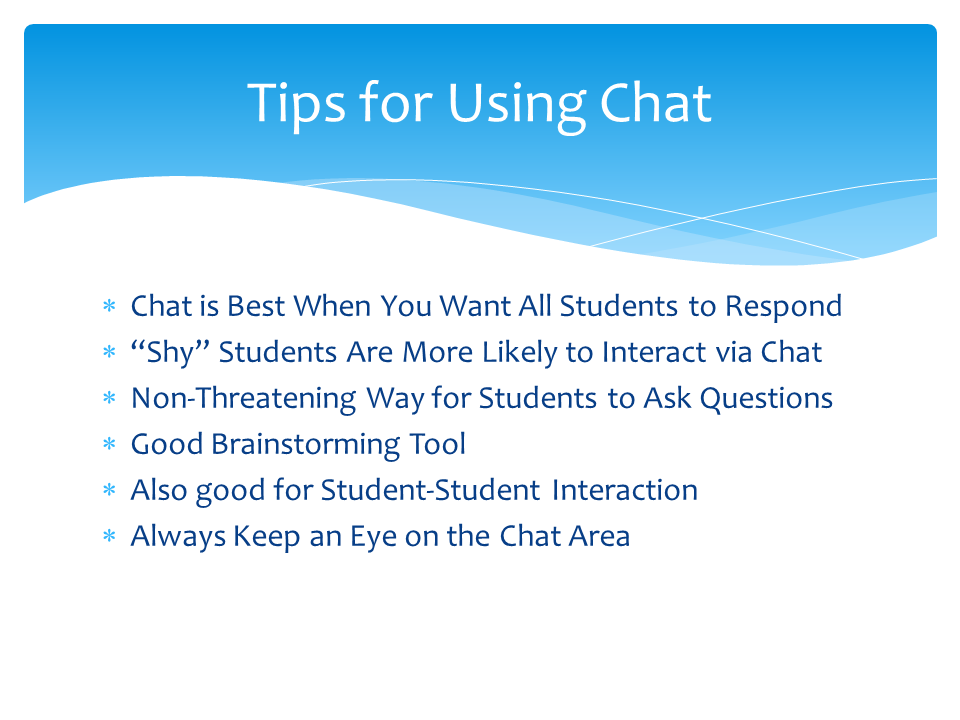
In the Confer tool set, the chat tool provides text-based chat, a log or transcript of which can be saved and reviewed after the session. Private and public text messages can be supported, and the text itself can be re-sized or reformatted to personalize the messages.


Some observations about the chat tool:
  • "Text chat is useful when the instructor would like all participants to respond, in contrast to using audio for a single response.”- Clark, R. C., and Kwinn, A. The New Virtual Classroom: Evidence-Based Guidelines for Synchronous e-Learning. San Francisco: John Wiley & Sons, 2007, p.53.

  • “Depending on your familiarity with the virtual classroom features and your ability as a presenter to multitask, using the chat facility may or may not be a good option for you. Audience size should be a consideration when planning this type of feedback method. We’ve discovered that having another facilitator or production assistant available to help support direct messaging (chat) is a valuable asset when managing the event’s conversation flow.” - Sandra Johnsen Sahleen. “Creative Interactions in the Virtual Classroom.” In Clark, R. C., and Kwinn, A. The New Virtual Classroom: Evidence-Based Guidelines for Synchronous e-Learning. San Francisco: John Wiley & Sons, 2007, p. 124-25.

  • “… a useful feature of text chat is that it can provide learners with a non-threatening way to pose questions or communicate other needs with the instructor. Questions on the mind of one learner are often on the minds of others. If instructors aren’t able to answer all questions during
    the allotted class time, they can usually save the text chat and respond to questions after class.” - Tansey, Joe. “Learning to Effectively Use the Virtual Classroom.” In Clark, R. C., and Kwinn, A. The New Virtual Classroom: Evidence-Based Guidelines for Synchronous e-Learning. San Francisco: John Wiley & Sons, 2007, p. 65.

  • “Because chat offers a seductive opportunity for participants to communicate with one another privately at any time during a session, we recommend setting some ground rules regarding its use. For example, we ask participants to use chat for on-task communication only during instructional activities – no passing notes in class.!” - Clark, R. C., and Kwinn, A. The New Virtual Classroom: Evidence-Based Guidelines for Synchronous e-Learning. San Francisco: John Wiley & Sons, 2007, p. 112.

  • “One way to use private messaging is to pair participants up to discuss an exercise or question by sending messages back and forth to each other. “ - Clark, R. C., and Kwinn, A. The New Virtual Classroom: Evidence-Based Guidelines for Synchronous e-Learning. San Francisco: John Wiley & Sons, 2007, p. 111.

  • “Instructors can also use text chat to allow all learners to respond to a question or exercise. Participants can view all responses instantly. This is a valuable way for participants to share a wealth of ideas and information. Text chat can be more efficient for some exercises than using the virtual classroom white board tool. Text chat makes it easy for all involved to match responses with contributors, and no responses are overwritten or erased – which can be a risk with some white board tools.” - Tansey, Joe. “Learning to Effectively Use the Virtual Classroom.” In Clark, R. C., and Kwinn, A. The New Virtual Classroom: Evidence-Based Guidelines for Synchronous e-Learning. San Francisco: John Wiley & Sons, 2007, pp. 65-66.

  • “A disadvantage of chat is the limited amount of screen real estate dedicated to text messages in most virtual classroom interfaces. When the response box fills, new text messages cause older responses to scroll up. If you have a larger class, you may want to use some crowd control mechanisms to limit who sends messages. For example, you might ask everyone to type in an answer but only the women or only a certain division to actually send their answers. Alternatively, you may provide a workbook in which everyone responds and, then, after a pause, call on only some participants to type in their answers.” - Clark, R. C., and Kwinn, A. The New Virtual Classroom: Evidence-Based Guidelines for Synchronous e-Learning. San Francisco: John Wiley & Sons, 2007, p. 110-11.

Friday, March 1, 2013

Live Online Events: Keys to Successful Management

It sounds easy: let's all get together at noon and have a presentation from one of our speakers. We'll look at a few slides, maybe watch a video, take questions, and discuss the whole thing together. Maybe we can even poll the members to see what they think about the key issues. Let's plan to be through in an hour, but I'd like some way to record the proceedings so anyone who can't make it can review later. I'd like you to facilitate, okay?

Oh, did I mention we'd be online?

Sooner or later, if it hasn't happened yet, you'll be asked to do something like this. Live online is a fact of modern collaboration, and it's a great maximizer of time and resources, especially when managed properly. My advice to get the maximum return for these events is to invest in preparation time so that everything goes as you'd like it to go.

Protocols. If you plan to archive (record) the event, it's standard practice to inform live participants of the fact. You can do this verbally or you can prepare a slide in advance that "warns" them that the event is being recorded. This gives them the opportunity to participate accordingly. Similarly, if the event is being captioned, it's a good idea to show participants how to open and close the captioning window, along with some instructions about how to make adjustments to font, size, etc. Letting participants know how and when - or if - their questions can be asked is also important. These standard protocols are generally called "housecleaning" tasks and should occur prior to the presentation and before the "record" button is pressed.

Publicity. At CCC Confer, we send e-mails to constituents announcing Webinars well in advance. We also use our Facebook page, the TechEdge newsletter, and listservs to publicize these events. (An example of an e-mail Webinar announcement is included.) If it's possible to include a calendar link that will automatically populate an online (e.g. Outlook) calendar and include the sign-in details, you'll be better assured that your audience will remember to attend and know how to log in when they need to.

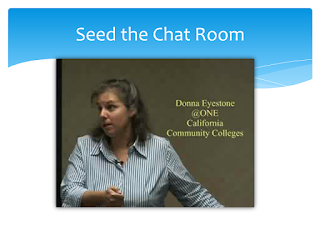
Prompts. I've noticed that the best facilitators always seem to ask the right questions of our Webinar presenters and are able to solicit audience participation precisely when it's appropriate. After discussing their techniques with them, I learned that their "spontaneity" is planned: they spend time before the event thinking up the questions they will ask and planning how to stimulate audience participation. They keep a text document handy with chat "prompts" which they copy and paste into the dialogue at appropriate times so that there is always something to interest the online participants. They call this "seeding the chat box."

Pre-Loads. If the presenter wants to show a video, the file has to be pre-loaded into the multimedia library to avoid delays during the online presentation. Similarly, large files, if they are to be shared with the audience, should be pre-loaded so that no time is lost waiting for them to be delivered. In the synchronous online environment, even the slightest delay - a few seconds - can seem to last much longer.

Practice Run. Although it's not always possible to get a guest speaker to practice with you before an event, it's very helpful. Even if they can't make it, though, you'll benefit from pre-loading and testing the software, slides, content, and timing. This allows you and/or the presenter to make adjustments beforehand and to anticipate audience reactions to the screens as they appear.

Every event has a beginning and an end, and generally there are other sequential points in the event where you want things to happen. You won't be able to determine these accurately if you can't tell when the slides will be finished, how long the video will last, or how fast (or slow) the presenter will be talking. Practicing with him or her makes it possible for you to plan the question-answer period properly and determine when breaks or interludes can be inserted. It avoids the irritating sense that you've had to speed up the presentation or cut off feedback because of the clock.


Friday, December 7, 2012

Best Practices for Synchronous Online Instruction: An Update


Slideshare recently contacted me to say that my presentation on best practices for synchronous e-learning had attracted more than 1,000 viewers. I know they meant well, but - instead of making me happy - I felt terrible! The presentation used a ton of embedded videos to make its points, and when I sent the slides to the site, none of the videos were included.
So here's my correction for those who may still be interested: the slides and the videos, together again. (To view the videos, click on the relevant images.)


Click to view


Click to view

Click to view

Click to view


Get Twitter Fan Box Widget