"Physical distance has vanished." - Yong Zhao, in Catching Up or Leading the Way: American Education in the Age of Globalization
My friend Pierre Thiry teaches high technology classes to students in Paris, France from his office in San Francisco. He does this in real time using CCC Confer's technology, and he tells me the students are enthusiastic and he is having a great time with the class. This venture could not have been attempted without the positive experiences Pierre and his colleagues at MPICT (Mid-Pacific Information and Communication Technologies) have had over the last two years using CCC Confer to make distance disappear.
Pierre's MPICT colleague Michael McKeever discovered that CCC Confer makes it possible for him to keep students in his classes even when they are unable to attend the physical classroom. He has had students travel to India for weddings, move out of state for jobs, or leave his college's district for various reasons. With Confer, they've been able to finish their classes by attending them online. Michael also teaches some classes so specialized that his own college does not have enough students qualified or interested in taking them. But he can get sufficient enrollment for these classes by drawing from five or six other colleges who offer a similar curriculum.
Michael even shows students how distance is dead by demonstrating the network routes Confer uses to provide real-time interaction across the ocean. From his classroom in Santa Rosa, California, he locates the 22 hops the data take to get to the network location of a student in Shanghai, China. He uses traceroute to locate the province router, the CHINANET backbone, the "leap" across the Pacific to San Jose, and the final jumps to Santa Rosa Junior College.
To the instructor and student in the Confer classroom, there is no distance. Each sees the other (if cameras are in use) or the other's data from a front row seat. Interactions between students in the next room or in the next county have equal impact. There are no geographical borders, barriers, or limitations to interfere with the teaching and learning process.
Friday, May 6, 2011


Friday, April 15, 2011
Results Prove: Online Student Support Leads to Student Success
"Online support transforms online classes from 30-40% killing grounds to more successful environments than classrooms." - Dr. Patt McDermid, Professor of Literature and Humanities at Sierra College
Sierra College has, over four years, collected significant data demonstrating the efficiency of online tutoring using CCC Confer in its Online Writing Center. Each semester's student population and results were gathered meticulously and the results are impressive.
Here's Patt discussing some of the statistics:
Students participating in the Online Writing Center (OWC) in the spring of 2009 succeeded at an impressive rate of 90% compared with their non-participating counterparts who managed only a 48% success rate. Moreover, all of the 59 individuals who participated in the OWC remained in the course, resulting in a 100% retention rate compared with an overall rate of 70-78% in online courses.

The data also indicate that online student support was more effective than face-to-face (on-ground) support.
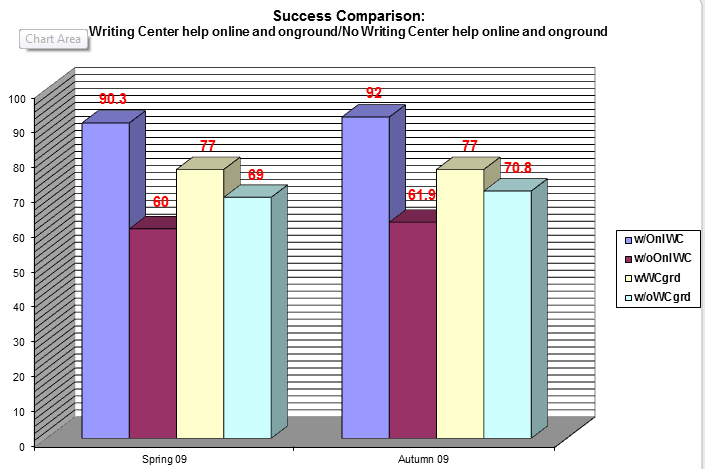
In the much more significant area of online student success - completing a course with a grade of “C” or better - 9 out of 10 students who received online writing help, regardless of those students’ assessed skill levels, received grades of ”C” or better.

As Patt says, "This thing really, really works."
Friday, April 8, 2011
When Travel Budgets Disappear, Teamwork Grows
"Too often travel, instead of broadening the mind, merely lengthens the conversation." - Elizabeth Drew
 |
| World Wide Web of Informatin |
"The most important trip you may take in life is meeting people halfway." - Henry Boye
Colleges and organizations throughout the state and country are slashing travel budgets to save money. We've done the same thing here at CCC Confer, and I have to admit that I don't miss the hotels, restaurant tabs, tips, airports, toll roads, car rentals, packing and unpacking, lost items, or germy travel environments as much as I thought I might. And I'm getting more done - with more people - by staying in my office and meeting with them virtually. Now that more people are foregoing statewide trips, I'm getting more opportunities to introduce them to the quickest, easiest, and most effective way to bring teams from different geographical locations together.
I recently helped to host an event at a local college that required speakers and attendees to drive to the event, food to be prepared and served, tables to be set up, equipment to be arranged, and a sound and video system to be tested. It took two hours to set up the room, ensure that the microphones and projector were working properly, skirt and decorate the tables, and work with the caterers. The keynote speakers each drove more than 100 miles to attend, so they also needed two hours advance time to get to the meeting and another two hours afterward to drive home.
For the same event, if it were to be held virtually, it would require less than five minutes to order the meeting and send e-mail invitations to all attendees. Loading the speakers' presentation might take another two minutes, and testing the audio connections might add another minute. In less than ten minutes, we'd be ready to go, and no one would have had to leave the home or office!
In the large room where my local college's event was held, there were corners of the room where it was difficult to see and read the speakers' slides, and even the P-A system was unable to bring an equally clear signal to all participants. The sunlight streaming through the windows reduced the visual clarity of the content, making it even harder to make out all of the images on the screen. In a Confer presentation, everyone sees exactly the same images and hears the same audio signals: there are no "cheap seats" in this environment and no problems with lighting. One of the speakers, anticipating potential problems with the room and presentation, brought more than 100 paper copies of his presentation, which had to be distributed throughout the room. In the Confer meeting room, a single click distributes a file instantly to all participants (even those who aren't in attendance but are able to view the archive later).
I'm not celebrating the budget crisis or decrying the virtues of travel. After all, I've got a collection of school gear from California colleges that can only be complete if I'm able to visit more schools. But there's no question that we waste a lot of time and money with face-to-face meetings that can easily be saved by taking the meetings online. With a good agenda, a prepared moderator, and motivated team members, you can accomplish more in a virtual meeting than is possible in most face-to-face conferences. I'm just happy that so many of my colleagues are discovering this for themselves and coming away from Confer experiences pleasantly surprised.
Friday, April 1, 2011
The Critical Teaching and Learning Issues Worldwide

"I am gratified to see that new technologies such as collaboration and video are globally increasing in importance in education, as they can open the door to a world of opportunities for students, regardless of socio-economic status or geographical location." - Renee Patton
A global survey recently commissioned by Cisco and conducted by Clarus Research Group indicates that more than three-quarters of educational administrators and officials around the world believe educational technology can change how students learn and how teachers teach. The countries surveyed were Australia, Brazil, China, France, Germany, India, Italy, Japan, Mexico, Russia, Saudi Arabia, South Africa, United Arab Emirates, and the United Kingdom; poll respondents were evenly divided between higher education and K-12.
Learning Issues
- 86% noted the need for programs and curriculum that develop skills in team- and project- based learning, with an emphasis on modern communications technologies.
- 85% of these educators saw technology playing a "large role" in how students learn, and were hopeful that student engagement and participation could be increased by using technology in education.
- 83% of respondents cited the need to prepare students to compete in a global economy, including the need for effective and productive use of technology.
- The top concerns of these educators were protection from Internet abuse, improved collaboration technologies, stronger cybersecurity measures, and administrative efficiencies that can be achieved through technology.
- Embedding video and multimedia resources in the learning process were seen by most of the respondents as a near-term goal.
- 65% of the higher education officials see online international programs as a realistic opportunity to enlarge their virtual student body within the next five years.
- Respondents from the Asia-Pacific region placed highest priority on communications with students and investment in the research infrastructure.
- European educators were mainly concerned about funding, online security, and increasing their international presence.
- Latin America rated highest on overall aspirations for education.
Friday, February 25, 2011
Using Students Experts

Angie Thompson's "daily experts" technique is a simple way to encourage student participation - both in traditional and online classes. "I list five or six students’ names on a PowerPoint slide at the beginning of my classes.... These individuals, assuming they are in class, then become my daily experts—the first ones I ask questions to or opinions of before opening discussion to the whole class. " Thompson says this technique breaks the ice and helps students realize that she is approachable. Other benefits she cites are providing for one-on-one interaction in large classes, encouraging class preparation, allowing all students at least one chance to speak in class, helping the instructor to learn names, and offering engagement to the entire class. I suspect that the accountability for class attendance - knowing that your name may be on the board today - may be positively affected as well.
Anonymity in the Confer classroom is both a good and bad thing. It's good when students don't feel embarrassed about their opinions or lack of skill. It's bad when students become disengaged, alienated, and feel that their performance and/or participation are unimportant or ignored. Having a technique like "daily experts" - which reinforces accountability - allows you as an instructor to make sure that your students feel individually responsible for paying attention, coming to class prepared, and participating in their own learning experience.
Since you have a class roster with the names of students always available, you don't have to prepare a PowerPoint slide before class with the names of the day's experts. Instead, you can select from the list of those present. Using the whiteboard tools, you can have the experts posted (see the image above) as an initial class activity, which will add to the intrigue and anticipation of the session. Doing this acknowledges students' presence and helps you (and the other students) get to know them as individuals. Students will begin to appreciate that there is no "hiding" in your classroom. And you'll benefit from the insights they give you into how well the material is being absorbed and understanding is growing.
Saturday, February 19, 2011
On the Horizon


The New Media Consortium's 2011 Horizon Report, produced jointly with EDUCAUSE, predicts technologies which will have a large impact on teaching, learning, and creative expression in higher education. Now in its eighth year of publication, the report is distinguished by predictions of adoption cycles in education; i.e., how long it will take teachers and schools to actually use these emerging tools. Let's look at what's on the near-term (one year or less) horizon.
Mobile computing is on the short adoption cycle (as with last year's report). Last year, Horizon cited the wide range of activities mobile devices make possible; this year, the report says, "mobiles are here because so many people use them as their first choice for accessing networked resources." For online instructors, the impact of mobile devices is that they can literally teach from and to anywhere there is a cell signal. I'm looking forward to the Java-enabled mobile device that supports Confer sessions, and at the same time I'm pushing for a mobile-ready version of the Confer classroom.
Also singled out for near term adoption are electronic books. Yes, we all know that texts can be downloaded and read on mobile devices, and that both devices and content are now readily available. But that's not the real point: "What makes electronic books a potentially transformative technology is the new kinds of reading experiences that they make possible." What's happening with this new technology is that our definition of "reading" is changing, with audiovisual, interactive, and social components mixing into the act and extending the process.
These predictions will be welcomed by iPhone, Android, Kindle, iPad, and shiny new app owners. It's important to remember, though, that we serve a student population that includes a large number for whom constant Internet access is not a given, and some for whom "reading" on a small screen is more of an obstacle than an advantage. We have to be careful not to create a new digital divide: between the mobile "haves" and the desktop- or "dumb-phone"- bound "have-nots": new technology adoption has to occur in a relevant and practical context.
Meanwhile, I'm excited by what's on the horizon. How about you?
Friday, January 28, 2011
Brevity is the Soul of Confer

We've said it here before: it's different online. Students don't come to the online classroom with the same expectations, instructors don't behave the same way online as in the traditional classroom, and the online classroom itself presents an environment that encourages some types of behavior while discouraging others. One thing the online classroom does not encourage is long, inactive lecturing. In fact, the best Confer sessions tend to be the ones that end quickly.
I was reminded of that when I read a Tim Sanders' piece about the power of a short talk. He used the example of TED Talks, which were designed with an 18-minute keynote time limit that is enforced with an active moderator and a public countdown timer. Richard Saul Wurman, who co-founded TED, was asked in an interview why he decided on 18 minutes. His answer: that's the time it usually takes for him to get bored when he's listening to someone.
There are several reasons why we should try to keep our Confer lectures short, even if this means that we have to provide more of them than we would face-to-face sessions. For one thing, it takes students longer to read and understand online content, so we can't flood the screen with print the same way we can deliver handouts to students in a classroom. (We can still deliver these handouts online, of course, but we should allow students to process them offline.) In the age - and medium - of YouTube, three minutes is ideal and five minutes is eternal. So an archived lecture that lasts for 20 minutes and requires students to watch it in its entirety is ... optimistic. Bandwidth is one concern, since nobody likes to wait for content to download, but the real issue is user expectations and behavior in this medium. Since YouTube and other online media have created the expectation that information can be packaged in condensed "chunks" for short viewing, online instructors may find it helpful to condense their own deliveries into shorter, more dynamic "clip-link" packages that allow students to access the information in parses and from multiple paths.
Subscribe to:
Posts (Atom)