"Storytelling is a powerful tool for teaching and learning. It's also a powerful tool for humanizing and clearly conveying complex messages and ideas." - Peter H. Reynolds, co-founder of Fablevision.
Reynolds proves his point with a video that illustrates the "four Cs" of 21st century learning: communication, collaboration, critical thinking, and creativity, Above and Beyond. Please take a look:
The video was written and illustrated by Mr. Reynolds and released by the Partnership for 21st Century Skills and Fablevision. There's also a poster you can download here to reinforce the lesson.
In the virtual classroom, communication is necessary to define problems and make solutions possible. Students and instructors can discuss concepts and misunderstandings, share information, clarify ideas, and develop new visions by using the audio tools, text chat areas, polls and emoticons, and whiteboard.
Collaboration makes it possible for collective or group efforts to exceed those of any individual. The virtual classroom allows students to work in breakout rooms, where they can present ideas and projects, work on problems, share computer applications, and come to consensus.
Critical thinking requires students to test hypotheses or assumptions and solve problems by means of a disciplined approach. Instructors in the virtual classroom can reinforce this skill by allowing individuals and groups to actively apply their skills in solving problems that the rest of the class can analyze and critique.
Creativity, the fourth C, involves new approaches and innovative processes. Newsweek recently lamented The Creativity Crisis, citing research that American creativity is declining. In the virtual classroom, instructors can encourage creative approaches by allowing divergent thinkers to mix with convergent thinkers, letting old ways of thinking combine with new insights or ideas. A recent study from IBM's Institute for Business Value shows that creativity is the most desired leadership quality among today's chief executives.
In a world where we are all interconnected and interdependent, students need the 4 Cs to interpret complex situations and find successful approaches to dealing with them. Let's help them by showing our own innovative natures in the virtual classroom.
Friday, July 29, 2011


Friday, July 8, 2011
Presence Is Not Learning, But It Helps

There's been a lot of attention in online education circles to "presence" in the online classroom. Much of this is traceable to the "Community of Inquiry" model proposed by Garrison, Anderson and Archer in 2000, in which social presence, teaching presence, and cognitive presence are seen as essential attributes of online instruction. Social presence is reinforced online (e.g., in the Confer classroom) by using emoticons, seeding the chat room, injecting humorous remarks, greeting students, asking individuals for opinions, and so on. Teaching presence is reflected in direct instruction (lecturing), demonstration, lesson designs, feedback, focused discussion, and similar activities. Cognitive presence is "the extent to which the participants in any particular configuration of a community of inquiry are able to construct meaning through sustained communication." This happens when the class collaboratively engages in problem-solving, brainstorming, exchanging information, exploring ideas, testing solutions, integrating new knowledge, etc.
Of course, this makes sense to online instructors in the Confer classroom (and anyone who's been following these blog posts). We've learned a lot about how to promote interaction and learner engagement by using smiley faces judiciously, inserting chat comments, and allowing students to write on our whiteboards. We can demonstrate how a well-designed Confer class session moves students from one concept to another and elicits their responses and understanding. And we're sold on the use of breakout rooms for collabative groupwork, application sharing to elicit interactive demonstration, and using the Confer toolset to maximize cognitive presence.
But presence is not all that's involved in learning. Getting students to interact with one another - and the instructor - are terrific ways to start the learning process. Reflection can be accomplished in a group environment as well. Talking to the instructor is essential. But there's an important element - instructional content - that requires individual learner engagement. Students have to read and digest texts, charts, data, practice exercises, notes, and subject matter in order to learn in most classes. Some of this can be done in the Confer classroom, but it's hard to imagine that all of it can. Every learner is unique, and individual intellects develop uniquely.
Knowledge is cumulative and community-based, and the interchange of ideas is vital to cognitive growth. So is critical thinking, studying, reflecting, assimilating, remembering, and practicing. Some of these are done together in the Confer classroom, and some necessarily occur in other contexts. But when they're allowed to co-exist, it's beautiful.
Thursday, June 30, 2011
How to Make Demonstrations Interactive

Instructors use interactive demonstrations to help students master a concept or technique that is eluding them, either because of misunderstandings, ambiguity, or the need for real-world or "concrete" examples. Application sharing is a tool in the Confer classroom that provides this kind of capability, and it can be used effectively to allow students to become involved in the subject matter, experience it by performing specified tasks, and reflect on the outcome.
If you're unfamiliar with application sharing, review the options in this video tutorial. As an instructor, you can request control of a student's desktop, and you can even decide to give control of your own desktop to a student. This is a great way to involve your students in real-time problem solving, demonstrations, and practice, but it requires some preparation on your part to make it work well. Here are some tips:
- Decide what you want students to see on your desktop, in what order, and how much of any given application (or document, screen, etc.) you want them to see. Here's a good explanation of why this is important.
- As you share your applications, explain to students what they're seeing and what you're doing. This also applies when students are sharing their (or your) applications. As the screen changes, students can become disoriented by pixellation or sudden moves, so it's important to interpret these changes by relating them to the actions that caused the screen changes. See this video for more information.
- Define the area of your desktop that will be seen by students. (This relates to the first point.) You want them to see certain areas, but not (usually) your Confer desktop. You can define this area in advance.
- Allow students to do what you're doing. Give one student control of your application, so that the other students will see these actions and hear your explanations along with those of the students. This approach keeps students "on their toes" because it makes everyone realize that they may be required to help demonstrate the application at any point during your class session.
Friday, June 3, 2011
Learning from the Confer Community

"We use the term community centered to refer to several aspects of community, including the classroom as a community, the school as a community, and the degree to which students, teachers, and administrators feel connected to the larger community of homes, businesses, states, the nation, and even the world." - John Bransford, Ann Brown, and James Pellegrino (eds.), How People Learn: Brain, Mind, Experience, and School (NAP, 2000).
The Confer community hasn't actually formalized yet, but it's available to anyone struggling with synchronous online instruction or toying with the idea of learning a new skill set that will make online classes more vibrant and effective. Every week, educators post archives of their classes, Webinars, and meetings in which tips and advice are freely shared. You can build a better lesson plan or help stretch your online skills without much exertion: all you have to do is drop in with a point-and-click. Here's a sampling of some of the amazing things I've seen from the Confer community in the past month:
Creating a Faculty-Driven Course Design Document with Joan Van Tassel
Creative Commons: Opening the Door to Sharing with Jane Park
Digital Citizenship: 21st Century Skills for a Media-Saturated World with Rebecca Randall
Encouraging Instructors to Explore Technology- Pitfalls and Opportunities with Rushton Hurley
Lessons Learned Moving an Introduction to Technology Course Online with Stephen Whiting
Online Course Accommodations for Students with Disabilities with Matt Gehrett
Open Textbooks and Learner Accessibility: Standards, Design, and Formats with Alice Krueger and Una Daly
Supporting your students in the online environment-How and Why with Peggy Hohensee, Michelle Lis, and Gina Quesinberry
Friday, May 6, 2011
The Death of Distance
"Physical distance has vanished." - Yong Zhao, in Catching Up or Leading the Way: American Education in the Age of Globalization
My friend Pierre Thiry teaches high technology classes to students in Paris, France from his office in San Francisco. He does this in real time using CCC Confer's technology, and he tells me the students are enthusiastic and he is having a great time with the class. This venture could not have been attempted without the positive experiences Pierre and his colleagues at MPICT (Mid-Pacific Information and Communication Technologies) have had over the last two years using CCC Confer to make distance disappear.
Pierre's MPICT colleague Michael McKeever discovered that CCC Confer makes it possible for him to keep students in his classes even when they are unable to attend the physical classroom. He has had students travel to India for weddings, move out of state for jobs, or leave his college's district for various reasons. With Confer, they've been able to finish their classes by attending them online. Michael also teaches some classes so specialized that his own college does not have enough students qualified or interested in taking them. But he can get sufficient enrollment for these classes by drawing from five or six other colleges who offer a similar curriculum.
Michael even shows students how distance is dead by demonstrating the network routes Confer uses to provide real-time interaction across the ocean. From his classroom in Santa Rosa, California, he locates the 22 hops the data take to get to the network location of a student in Shanghai, China. He uses traceroute to locate the province router, the CHINANET backbone, the "leap" across the Pacific to San Jose, and the final jumps to Santa Rosa Junior College.
To the instructor and student in the Confer classroom, there is no distance. Each sees the other (if cameras are in use) or the other's data from a front row seat. Interactions between students in the next room or in the next county have equal impact. There are no geographical borders, barriers, or limitations to interfere with the teaching and learning process.
My friend Pierre Thiry teaches high technology classes to students in Paris, France from his office in San Francisco. He does this in real time using CCC Confer's technology, and he tells me the students are enthusiastic and he is having a great time with the class. This venture could not have been attempted without the positive experiences Pierre and his colleagues at MPICT (Mid-Pacific Information and Communication Technologies) have had over the last two years using CCC Confer to make distance disappear.
Pierre's MPICT colleague Michael McKeever discovered that CCC Confer makes it possible for him to keep students in his classes even when they are unable to attend the physical classroom. He has had students travel to India for weddings, move out of state for jobs, or leave his college's district for various reasons. With Confer, they've been able to finish their classes by attending them online. Michael also teaches some classes so specialized that his own college does not have enough students qualified or interested in taking them. But he can get sufficient enrollment for these classes by drawing from five or six other colleges who offer a similar curriculum.
Michael even shows students how distance is dead by demonstrating the network routes Confer uses to provide real-time interaction across the ocean. From his classroom in Santa Rosa, California, he locates the 22 hops the data take to get to the network location of a student in Shanghai, China. He uses traceroute to locate the province router, the CHINANET backbone, the "leap" across the Pacific to San Jose, and the final jumps to Santa Rosa Junior College.
To the instructor and student in the Confer classroom, there is no distance. Each sees the other (if cameras are in use) or the other's data from a front row seat. Interactions between students in the next room or in the next county have equal impact. There are no geographical borders, barriers, or limitations to interfere with the teaching and learning process.
Friday, April 15, 2011
Results Prove: Online Student Support Leads to Student Success
"Online support transforms online classes from 30-40% killing grounds to more successful environments than classrooms." - Dr. Patt McDermid, Professor of Literature and Humanities at Sierra College
Sierra College has, over four years, collected significant data demonstrating the efficiency of online tutoring using CCC Confer in its Online Writing Center. Each semester's student population and results were gathered meticulously and the results are impressive.
Here's Patt discussing some of the statistics:
Students participating in the Online Writing Center (OWC) in the spring of 2009 succeeded at an impressive rate of 90% compared with their non-participating counterparts who managed only a 48% success rate. Moreover, all of the 59 individuals who participated in the OWC remained in the course, resulting in a 100% retention rate compared with an overall rate of 70-78% in online courses.

The data also indicate that online student support was more effective than face-to-face (on-ground) support.
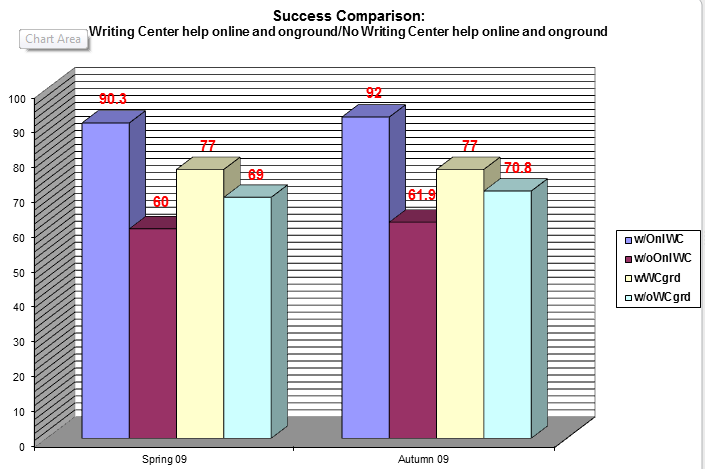
In the much more significant area of online student success - completing a course with a grade of “C” or better - 9 out of 10 students who received online writing help, regardless of those students’ assessed skill levels, received grades of ”C” or better.

As Patt says, "This thing really, really works."
Friday, April 8, 2011
When Travel Budgets Disappear, Teamwork Grows
"Too often travel, instead of broadening the mind, merely lengthens the conversation." - Elizabeth Drew
 |
| World Wide Web of Informatin |
"The most important trip you may take in life is meeting people halfway." - Henry Boye
Colleges and organizations throughout the state and country are slashing travel budgets to save money. We've done the same thing here at CCC Confer, and I have to admit that I don't miss the hotels, restaurant tabs, tips, airports, toll roads, car rentals, packing and unpacking, lost items, or germy travel environments as much as I thought I might. And I'm getting more done - with more people - by staying in my office and meeting with them virtually. Now that more people are foregoing statewide trips, I'm getting more opportunities to introduce them to the quickest, easiest, and most effective way to bring teams from different geographical locations together.
I recently helped to host an event at a local college that required speakers and attendees to drive to the event, food to be prepared and served, tables to be set up, equipment to be arranged, and a sound and video system to be tested. It took two hours to set up the room, ensure that the microphones and projector were working properly, skirt and decorate the tables, and work with the caterers. The keynote speakers each drove more than 100 miles to attend, so they also needed two hours advance time to get to the meeting and another two hours afterward to drive home.
For the same event, if it were to be held virtually, it would require less than five minutes to order the meeting and send e-mail invitations to all attendees. Loading the speakers' presentation might take another two minutes, and testing the audio connections might add another minute. In less than ten minutes, we'd be ready to go, and no one would have had to leave the home or office!
In the large room where my local college's event was held, there were corners of the room where it was difficult to see and read the speakers' slides, and even the P-A system was unable to bring an equally clear signal to all participants. The sunlight streaming through the windows reduced the visual clarity of the content, making it even harder to make out all of the images on the screen. In a Confer presentation, everyone sees exactly the same images and hears the same audio signals: there are no "cheap seats" in this environment and no problems with lighting. One of the speakers, anticipating potential problems with the room and presentation, brought more than 100 paper copies of his presentation, which had to be distributed throughout the room. In the Confer meeting room, a single click distributes a file instantly to all participants (even those who aren't in attendance but are able to view the archive later).
I'm not celebrating the budget crisis or decrying the virtues of travel. After all, I've got a collection of school gear from California colleges that can only be complete if I'm able to visit more schools. But there's no question that we waste a lot of time and money with face-to-face meetings that can easily be saved by taking the meetings online. With a good agenda, a prepared moderator, and motivated team members, you can accomplish more in a virtual meeting than is possible in most face-to-face conferences. I'm just happy that so many of my colleagues are discovering this for themselves and coming away from Confer experiences pleasantly surprised.
Subscribe to:
Posts (Atom)